
Large decision models often begin with data held in a database, a CSV file, or a mainframe export. Business analysts may still prefer to treat each row as a rule because decision tables make the logic easy to understand, change, and extend. OpenRules supports that familiar authoring model without forcing every large data set to remain inside an Excel workbook.
This guide explains four practical ways to work with very large decision tables: optimized BigTable execution, external CSV files, fixed-width files, and relational databases.
Optimized BigTable execution
A BigTable looks like a regular OpenRules decision table, but uses the keyword BigTable. Behind the table, OpenRules applies a self-balancing binary-search mechanism adapted to decision-table logic. Depending on the model, this can improve execution performance by a factor of 10 or even 100.
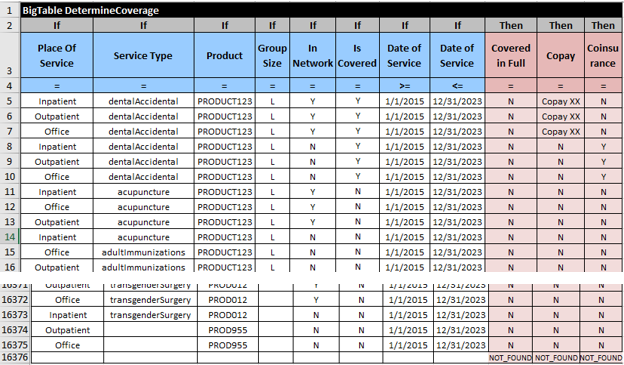
The MedicalServiceCoverage example contains more than 16,000 rules in an Excel file of almost 3 MB. When deployed as a BigTable, the lookup can complete in under one millisecond. BigTable condition columns support the comparison operators =, >, <, >=, and <=. Action columns can assign, add, subtract, or multiply values.
Use BigTableSingleHit when the first matching rule determines the result, or BigTableMultiHit when several matching rows must contribute to the outcome—for example, when accumulating a score.
Keep the logic in Excel and the rows in CSV
When a table grows into hundreds of thousands of rows, Excel itself can become slow to search, edit, load, and distribute. In that situation, keep the business logic and column semantics in the decision table while moving the row data to a CSV file.
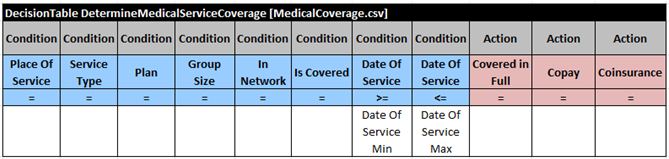
The first table row references MedicalCoverage.csv. The next row still expresses business meaning: the date of service must fall between the minimum and maximum dates. The CSV rows provide the values evaluated by that logic.
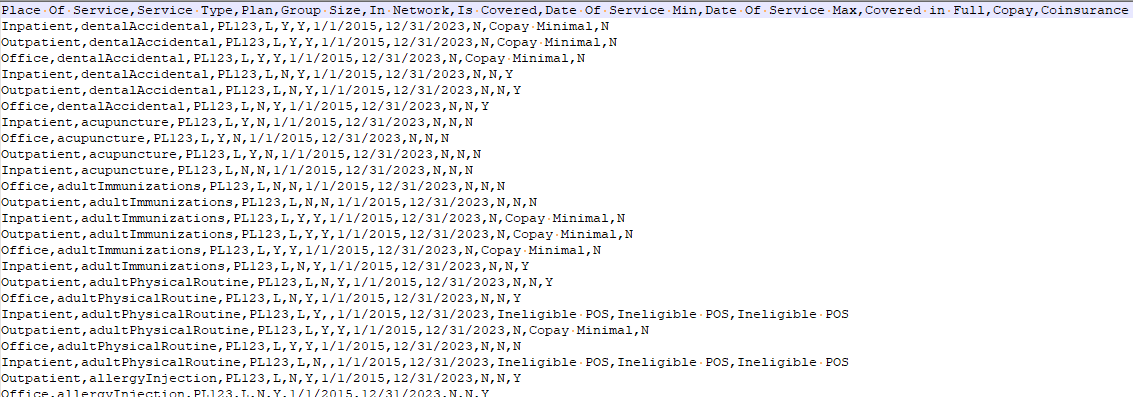
The same approach works for much larger collections. The ICD10 example searches roughly 70,000 incompatible diagnosis-code pairs without placing those pairs directly in Excel.
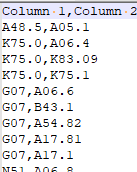
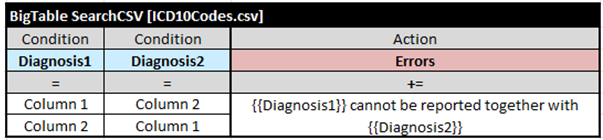
A multi-hit table can collect every matching code, while the special # action returns the first matching row number.

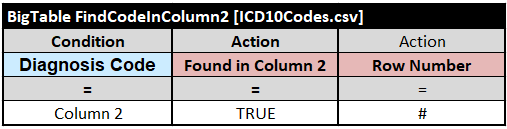
OpenRules can search large external data sets with very little overhead, while the decision model consumes far less memory. The same external-file pattern works with regular decision tables and BigTables.
Read fixed-width files from mainframe systems
Some organizations receive operational data in fixed-width files. Each field occupies a defined number of characters, so no delimiter is required. OpenRules supports this format as another source for decision-table rows.
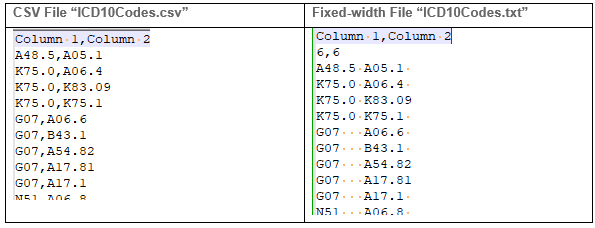
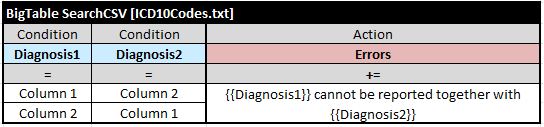
Reference a .txt file in the table instead of a .csv file. OpenRules uses the extension to select the fixed-width reader, while the decision-table conditions and actions remain unchanged.
Apply business rules directly to database records
When the data already belongs in a relational database, Rule DB lets a decision model retrieve it at runtime. The goal is to keep technical access logic separate from the business rules applied to each selected record.
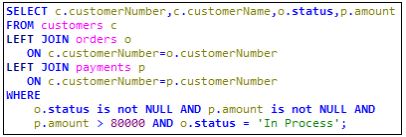
A DataSQL table captures the technical relationships between database tables. Conditions that express business policy can move into an ordinary decision table where subject-matter experts can maintain them.

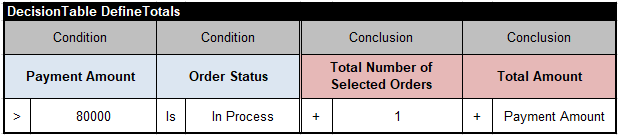
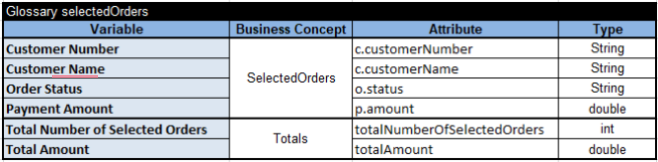
An iteration table applies the business rules to every selected order, and the glossary maps the query results to decision variables used throughout the model.

Choose the storage that fits the model
- Excel: best when the full table remains comfortable for business users to review and maintain.
- CSV: useful for large, portable data sets with a simple delimited structure.
- Fixed-width files: appropriate for established mainframe and batch-data exchanges.
- Relational databases: the natural choice when records already live in an operational data store.
In every case, the decision-table structure stays readable while OpenRules selects an execution and storage strategy suited to the size of the data.
Adapted from Jacob Feldman’s LinkedIn article, Big Decision Tables, published August 15, 2023.