
Rule Solver 12.3.0 takes advantage of the substantially updated JSR 331 Standard and JavaSolver API. Rule Solver can now work directly with many more Constraint and Linear/MIP solvers, most of them without manual installation. The newly supported solvers are listed below.
Constraint Solvers
- CHOCO version 6.0.1
- CONSTRAINER version 5.4.4 (JSR 331-specific version supported by OpenRules)
- JACOP version 4.10.0
- JSETL version 3.0
- MAXICP version 1.0.0
- SUGAR version 2.1.3
All these solvers are open source.
Linear/MIP Solvers
- CLP version 3.0.0 (a linear/MIP programming library based on the Coin-OR CLP linear solver)
- COIN version 1.8.0
- CPLEX
- GLPK version 4-65
- GUROBI version 5.0.1
- LPSOLVE version 5.5.2
- OJALGO version 57.6.2
- SCIP version 10
- SSC version 4.7.8
Only the commercial solvers CPLEX and GUROBI require special licensing and installation. All other solvers are open source and will be installed automatically from the common Maven Repository during their first use.
To switch between solvers, change only the SOLVER property; no changes to your model are required. You can do this in the test.bat file for Windows or the test.sh file for Linux/macOS, as shown below.
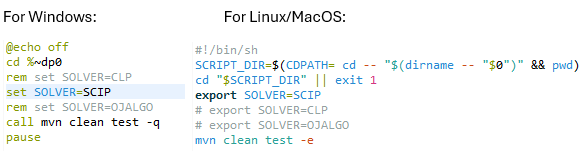
The names of solvers should use all capital letters as shown above. If the property SOLVER is not defined the default constraint solver is MAXICP and the default linear/MIP solver is SCIP.
To use the updated Rule Solver and JSR 331, you need JDK 21 or higher installed.
You may download the latest Rule Solver. This installation includes many simple and complex decision models with optimization capabilities. You can find their descriptions here.
The OpenRules team will be glad to help you develop your custom optimization decision models. Contact support@openrules.com with any questions or comments.