
Testing facilities
Test decision models with business-owned data.
OpenRules provides the tools to build, test, and debug business decision models. Subject-matter experts can define test cases in familiar Excel tables or JSON, then run them in batch mode or inspect execution in the graphical Rule Debugger.
01 · DecisionTest
Test cases in Excel
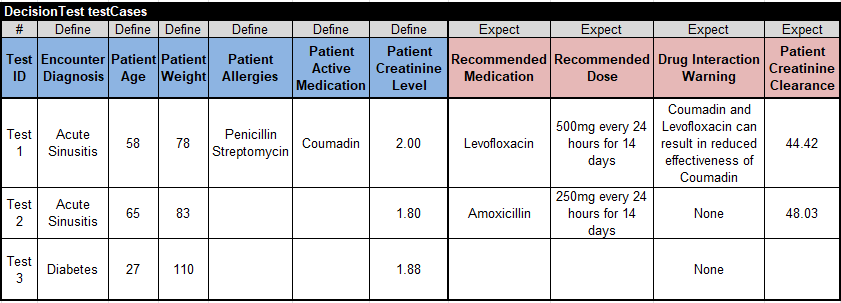
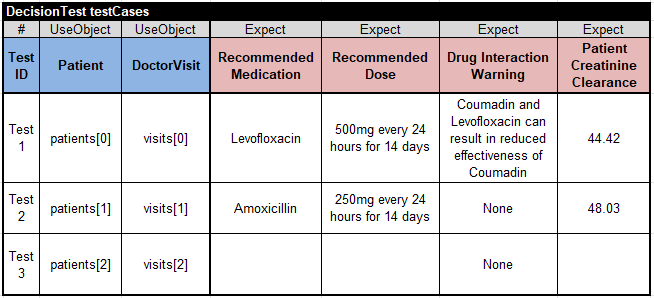
Use predefined OpenRules tables of the types DecisionTest and DecisionData to create executable test cases for decision models. The Patient Therapy decision model, included in openrules.samples, contains a DecisionTest table describing three test cases.
Blue Define columns provide test values for input decision variables. Reddish Expect columns provide expected values for output decision variables. If an expected value does not match the actual value produced during execution, OpenRules reports the mismatch.
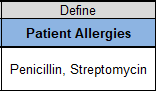
The “Patient Allergies” column defines a text array of type String[]. Enter each allergy on a new line in Excel with Alt+Enter, or list the values separated by commas.
You are not limited to one DecisionTest table. A project may contain multiple uniquely named DecisionTest tables, and OpenRules executes all of them.


02 · DecisionData
Organize complex test data
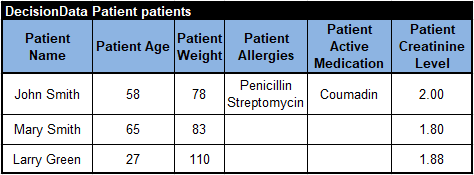
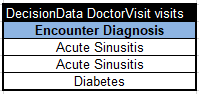
When test data has a more complex structure, define separate data tables for each business concept. In the Patient Therapy example, one DecisionData table creates the patients array and another creates the visits array for the DoctorVisit concept.
The DecisionTest table can then use compact UseObject columns. Cells refer to array elements using zero-based indexes: patients[0] is the first patient, while visits[2] is the third doctor visit.
Note: the keywords Define, Expect, and UseObject are case-sensitive.
03 · References
Connect DecisionData tables
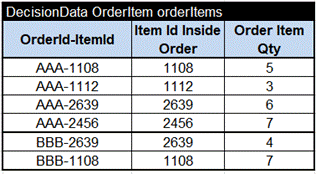
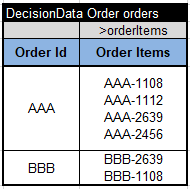
The Order Promotion example defines one DecisionData array for order items and another for orders. The reference >orderItems tells OpenRules that values such as AAA-1112 and BBB-2639 are primary keys that identify rows in the orderItems array.
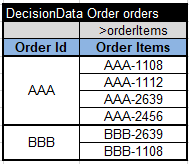
Order item IDs can begin on separate lines in the same cell. Alternatively, place them in individual sub-rows and merge the associated order cell.
04 · Test selection
Activate only the cases you need
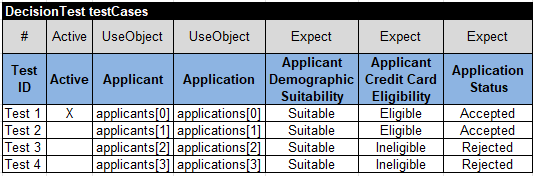
Use a column of type Active to select the test cases that should run. In this Credit Card Application example, only the first test case is marked with an X, so only that case is executed. If every cell in the Active column is empty, OpenRules executes all test cases.
05 · JSON
Use existing JSON test data
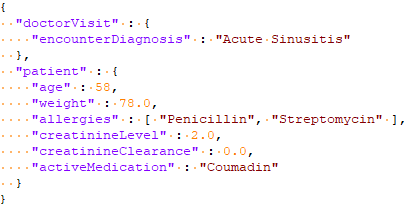
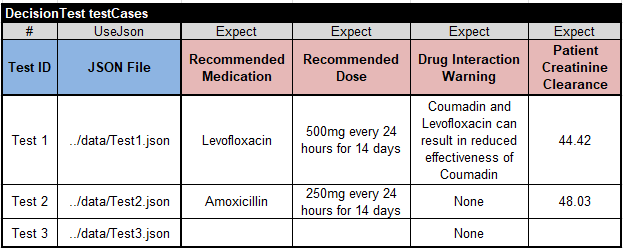
When test data already exists in JSON, it can be used directly. The Patient Therapy model includes a data folder with Test1.json, Test2.json, and Test3.json.
A DecisionTest table with a UseJson column refers to each JSON file. The data folder is located beside the project’s rules folder.
06 · Execution
Build and execute the test suite
After defining test cases, specify the test workbook in the standard project.properties file. The test.file property identifies the file containing the tests.
Double-click test.bat to execute the test cases. When the model is new or has changed, OpenRules first builds it and then runs the generated code against the tests.
- Analyze the decision model for errors and consistency.
- Generate the Java code used for testing and execution when the model is valid.
- Report design errors in red in the execution protocol.
- Run the generated code against the selected test cases.
When all tests pass, the execution protocol shows the actions and results. test.bat also creates explanation reports in target/reports, using a readable HTML format that records executed rules and the values of relevant decision variables. Learn more about logging, reporting, and explainability.

Try the examples
Build and test a working decision model.
The free evaluation includes Patient Therapy and other ready-to-run examples with test data you can inspect and adapt.