
Introduction
OpenRules® helps enterprises develop operational decision services for their decision-making business applications. OpenRules provides a set of decision intelligence software tools. It allows business analysts to develop, test, deploy, and continue to maintain operational business decision models.
OpenRules is oriented toward business analysts (subject matter experts) allowing them to:
-
Create business decision models in Excel files using decision tables and other standard decisioning constructs to represent sophisticated business decision logic.
-
Test/Debug/Execute Decision Models and Analyze the produced decisions.
-
Deploy decision models as ready-to-be-executed decision microservices on-cloud or on-premises.
-
Connect Decision Service to a relational database.
-
Learn Business Rules from your historical data.
-
Find Optimal Decisions.
OpenRules includes the following tools:
-
Rule Learner for rules discovery
-
Rule Solver for decision optimization
-
Rule DB for integration with databases
OpenRules provides a special User Manual for Business that describes how non-technical people can do it. This manual is oriented to software developers who can help business analysts to do all these tasks plus to integrate tested decision models into their IT systems using different deployment options. We strongly recommend software developers first familiarize themselves with the first two chapters, “Installing OpenRules Software” and “Introductory Decision Service.”
Decision Models Organization
After the installation, take a look at the simplest decision project “Hello” in the folder “openrules.samples”. It is completely oriented to business people with no programming expertise. As many other decision models, it has a typical decision model structure:
-
rules – a folder called “Rules Repository” with the following Excel files:
-
DecisionModel.xlsx with the Environment table that refers to all Excel files that compose this decision model;
-
Glossary.xlsx with the table Glossary that describes all decision variables used by this decision model;
-
Rules.xlsx with decision tables that implement business logic;
-
Test.xlsx with tables that describe test cases.
-
project.properties – a file that describes the project’s properties
-
test.bat – a batch file used to build and execute this decision model (for Mac and Linux the proper file is “test”). There is also file “build.bat” that is used for build only, but business people do not use it as “test.bat” does everything they need. Sometimes, when they receive some build errors, it’s better to run “build.bat” as it includes the Maven’s flag “-e“ to produce more explanations.
-
clean.bat – a batch file to clean up the project in situations when you want to re-build it, e.g. after installation of the new OpenRules release.
-
explore.bat – a batch file to start OpenRules Explorer
-
pom.xml – a configuration file that contains information about the project and configuration details used by Maven to build the project.
Creating Custom Decision Model
To create a new decision model, you may simply copy any existing sample-project such as “Hello” into a new folder, say “MyProject”, and make the following change in the file “pom.xml” (see line 7):
<artifactId>Hello</artifactId>replace to
<artifactId>MyProject</artifactId>Also, make sure that you are using the latest release of OpenRules (e.g. 11.1.0) by setting
<openrules.version>11.1.0</openrules.version>You may place your project anywhere on your hard drive. Then you may double-click on “test.bat” to make sure it works, and then start making changes in your Excel files and “project.properties”.
How Business Analysts Deal with Decision Models
As a developer, you may want to know what business analysts are supposed to do by looking at the introductory decision model “Vacation Days” described in the User Manual for Business Analysts. You should understand the structure of tables “Glossary” and “Environment” that play an important role in the integration of business and IT.
Glossary
Every decision model requires that decision variables (goals and input variables) are described in the special table called “Glossary”. Here is an example of a glossary described in the file “VacationDays/rules/Glossary.xlsx”:
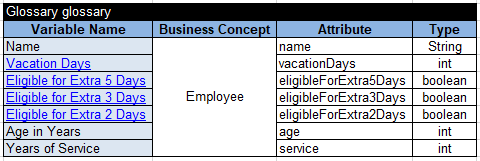
The signature row “Glossary glossary” should have all columns inside it to be merged. The first column “Variable Name” contains the names of decision variables exactly how they were used inside the decision tables.
The second column “Business Concept” contains the name of a business concept to which these variables belong. It usually corresponds to a Java class (already existing or generated by OpenRules) and thus should not contain spaces. Note that merging cells inside the second column “Employee” indicates that all variables on the left belong to this concept.
The third column “Attribute” provides technical names for all decision variables – they usually correspond to the attribute names inside the corresponding Java classes or JSON structures. The name should follow the Java Beans naming convention.
The fourth column “Type” describes the expected type of each decision variable such as “String” for text variables, “int” for integer variables, “double” or “float” for real variables, “Boolean” for logical variables, “String[]” for an array of text variables, etc. These types should be valid Java types or other business concepts but a business analyst doesn’t have to even know this fact and just memorize the most frequently used keywords such as String, int, double, Boolean, Date.
A glossary may contain optional columns such as:
-
“Description” with a plain English explanation of the term
-
“UsedAs” with possible values Input, Output, InOut, Temp, Const
-
“Domain” lists possible values of the variable, e.g. 1-120 for Age, Single, Married for Gender.
These columns could be very helpful to understand the decision model.
You may notice that some decision variables (goals and sub-goals) are hyperlinked to point to the decision tables (worksheets) that specify these goals. A click on the variable inside the glossary will immediately open the xls-file and the table that specifies this variable. It’s easy to do using Excel Hyperlinks and is very convenient for the future maintenance of your decision models when you want to find out “what is defined where”.
Usually, a business model has one glossary. But if it’s too big, you may split it into several tables of the type “Glossary”. For example, the sample project “InsurancePremium” contains 3 files “GlossaryClient.xlsx”, “GlossaryDriver.xlsx”, and “GlossaryCar.xlsx” with separate Glossary tables for glossaryClient, glossaryDriver, and glossaryCar.
Environment
There is one more important file “VacationDays/rules/DecisionModel.xlsx” that describes the structure of the decision model in the table “Environment”:

This table states that our decision model includes files “Glossary.xlsx” and “Rules.xlsx”. Your model can use multiple xls- and xlsx-files located in different folders, and you can define them all in the Environment table relative to the file “DecisionModel.xlsx”. If your entire decision model is described in one Excel file, you don’t need to define the Environment table at all. You can use wildcard characters such as **/*.xlsx to include all Excel files in all subdirectories of your rules repository.
Note. Along with “include” the Environment table may use “import.java” and “import.static” to add references to 3rd party Java classes – see below.
Test Cases
A decision model may include test-cases described in an Excel file such as “VacationDays/rules/Test.xlsx”. The table “DecisionTest”
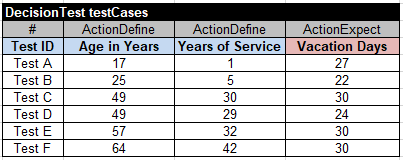
describes 6 test-cases. The first column “#” defines the name of the test. The second and third columns “ActionDefine” defines the Employee’s attributes you want to test. The column “ActionExpect” specifies the expected values of the decision variable “Vacation Days”.
Building and Testing Decision Model
OpenRules provides a decision engine capable to build, test, and deploy business decision models on-premise or on-cloud. There are several bat-files in every project folder such as “VacationDays” that help a business user to execute OpenRules decision engine to build/test decision models.
Configuration File “project.properties”
After you complete the design of your decision model and its test cases, you need to adjust the standard file “project.properties”. An example of such a file was provided for the introductory model as follows:

Usually, you need only two properties:
-
model.file – it is usually the file “DecisionModel.xlsx” that describes the structure of your model in the Environment table
-
test.file – the name of the file that contains your test cases (it could be omitted if you test your model directly from Java or as a service)
There could be several optional properties:
-
run.class – the name of a Java class that will be used instead of the standard OpenRules class; see an example in the project “HelloJava”;
-
trace=On/Off – to show/hide all executed rules in the execution protocol;
-
report=On/Off – to generate or not the HTML-reports that show all executed rules (and only them) with explanations why they were executed;
More properties could be added for different deployment options. If you add the same properties that were defined in the Environment table to the “project.properties”, they will take a precedence.
File “test.bat”
The file “VacationDays/test.bat” is used to build and test your decision model (on Mac and Linux instead of “test.bat” you use the file “test”). This file is the same for all standard decision models and you don’t even have to look inside this file. When you double-click on this file, it will do the following:
- If the model hasn’t been built yet or some files where changed, it will execute these steps:
-
Analyze all files included in your decision model and check the model for possible errors;
-
If there are errors, it will show the errors pointing to the reasons and the proper place in Excel files;
-
If there are no errors, it will generate Java classes (in the folder “target”) needed internally to execute this decision model;
-
The generated Java classes will be compiled preparing the decision model for execution.
- After a successful build, the decision model will be executed against test cases described in the “Test.xlsx”.
You will also find the file “VacationDays/build.bat” that can be used to build the decision model as well, but it will execute the model only after rebuild.
Testing Results
During the execution, you will see the execution protocol similar to the shown on the next page. This execution protocol was produced with “trace=On” and it shows all executed rules with references to their locations in Excel, e.g.
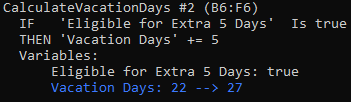
It also shows all decision variables involved in the executed rules with their values before and after rule execution. The attributes that were changed are highlighted in blue.
If OpenRules finds a mismatch (highlighted in red) between the expected and produced results it will show the problem in the following way:
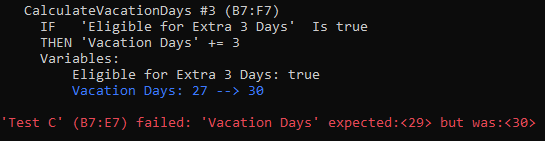
Then you should decide if you made mistakes in your rules or the expected results.
Generated Reports and JSON tests
After the execution, you also may look at the generated HTML reports that explains which rules were executed and why (assuming the property report=On). The report is generated in a user-friendly HTML format in the folder “target/reports” – one html-file for each test case. You also will see the HTML report “target/reports/project-files.html”.
If your file “project.properties” defines the property “deployment” OpenRules will generate a set of JSON files in the folder “target/jsons” that correspond to all Excel-based tests.
Internal Use of Maven
OpenRules actively uses Apache Maven as a build tool. All OpenRules Decision Manager projects are mavenized. Below is an example of a typical pom.xml file (from the sample project “Hello”).
Note that it is important to use

OpenRules provides its own Maven’s plugin that is included in all “pom.xml” files:
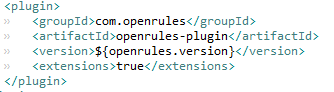
Hello/pom.xml:
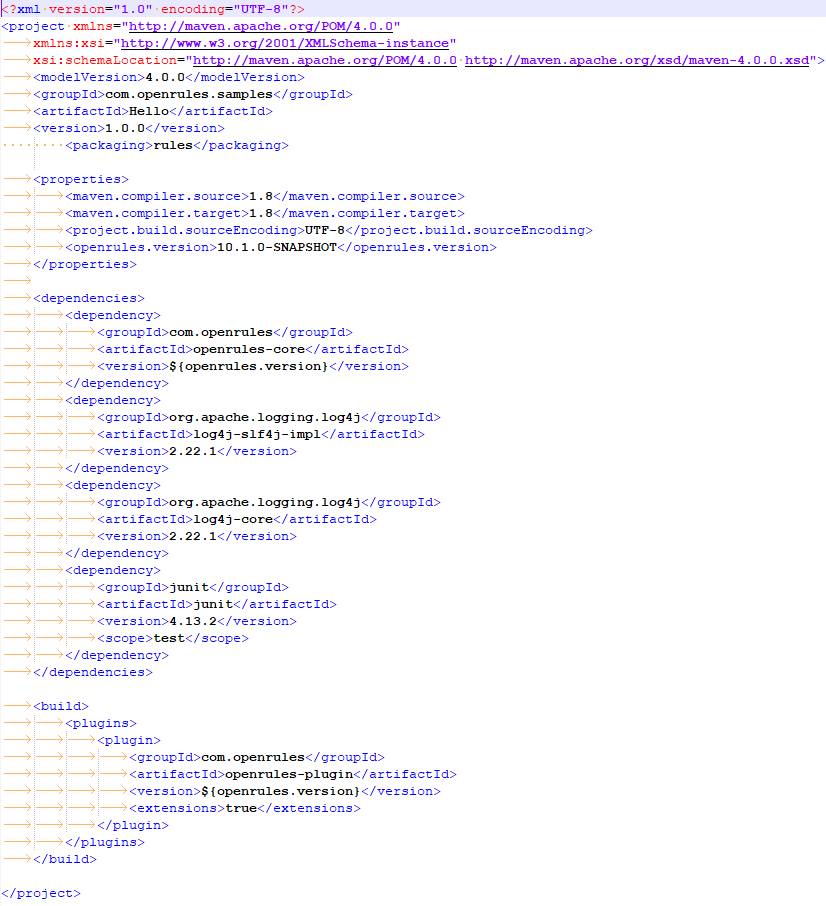
The files “test.bat”, “build.bat”, and “clean.bat” are simple batch files created for the convenience of a business analyst who isn’t expected to know anything about Maven. These files use Apache Maven that should be pre-installed. As a developer familiar with Maven, you always may run Maven’s commands directly from a command line.
OpenRules uses an automated vulnerability check that utilizes the NVD, the U.S. government repository. So, OpenRules releases always upgrade the used 3rd party packages to avaiod recently found vulnerabilities. You may find the latest list of dependencies here.
Using Java inside Decision Models
Java Objects inside Decision Models
Business people usually define their test-cases in Excel using tables of the types DecisionData, Glossary, and DecisionTest. Instead as a developer, you may define business concepts as Java classes. For example, in the sample-project “VacationDaysJava” there is a Java class “Employee” located in the class “Employee.java” of the package “vacation.days”. It is a simple Java bean with the same attributes as defined in the Glossary, and all getters and setters. Note that this Java class should be located in the same package which is defined in “model.package” the table “Environment” in the file “DecisionModel.xlsx”:
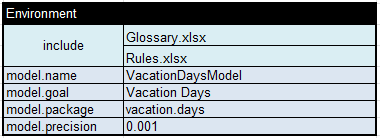
Now, the decision model will use the new Java class as a data type and will check that its attributes are the same as defined in the Glossary. When you execute “test.bat”, it will rebuild the model and will produce the same results using the same test-instances.
Java Snippets inside Decision Tables
OpenRules allows a user to write various arithmetic and logical expressions directly inside decision table cells. For instance the project the sample project “PatientTherapy” contains this decision table:
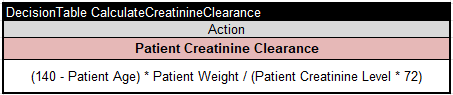
However, OpenRules also allows a user to add snippets of Java directly in Excel-based tables starting with “:=”. Here is an example:

OpenRules recognizes that content of the cell as a Java snippet if you start it with “:=”.
The expression itself can be any valid Java snippet including standard Java functions. This snippet may refer to decision variables defined in the Glossary using so-called macroses like ${Patient Age} or ${Patient Weight}. If you want to refer to a business concept you may use a special macro with the indicator “O”, e.g. the macro $O{Patient} can be used in the snippet := System.out.log($O{Patient{.toString()); to print the object “Patient”.
Inside the Java expressions you may use any operator “+”, “-”, “*”, “/”, “%” and any other valid Java operator. You may freely use parentheses to define the desired execution order. You also may use any standard party Java methods and functions, e.g.
Math.min( ${Line A}, ${Line B} )
OpenRules also supports special tables of the type “Method” or “Code” to put a piece of Java directly in Excel. For example, you can create this table of the type “Method”

Then call this method can be invoked by using this table:

The first statement in the table “CreatinineClearanceFormula” creates a double variable “pcc” using a formula with macros like ${Patient Weight}. The second statement returns the value of pcc rounded to 2 digits after the decimal point. You may use any valid Java statement (including if-then-else and for-loop) inside the Method’s body.
As you can see, after the keyword “Method”, you may put a regular Java signature. The “void” after the keyword means that this method doesn’t return anything. You may put as many parameters as you wish after the method’s name – here we use only one parameter (Decision decision).
You may replace the above two table with one table of the type “Code”:

It explicitly set the calculated and rounded value of pcc to the variable “Patient Creatinine Clearance”. It assumes only one parameter “decision” of the type Decision used in the second statement. However, this table should be explicitly invoked from the main method.
Using 3rd Party Java Methods
To use your own or any 3rd party Java methods, you need to add them to the Environment table using “import.java” or “import.static”. For example, the standard project “PermitEligibility” uses Java methods defined in the optional OpenRules package “com.openrules.tools” included into the standard installation. So, the proper table “Environment” for this project is defined as follows:
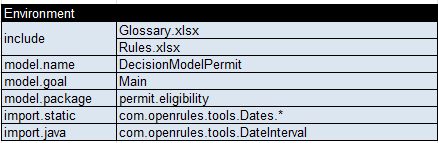
Here ”import.java” provides your decision model access to all methods of the class “com.openrules.tool.DataInterval” while “import.static” provides access to static methods of the class “com.openrules.tool.Dates”. If you forget to add these import-statements in the Environment table, you will receive compilation errors in the generated code:

Another good example is the standard project “SpatialRules” that uses a large 3rd party library. 3 jar-files for the JTS library from Vivid Solutions have been included into the project’s classpath. The project include its own simplified Java interface to this JTS library implemented in the Java package “com.openrules.spatial”. To make all these Java methods accessible from the decision model, the project uses the following table:
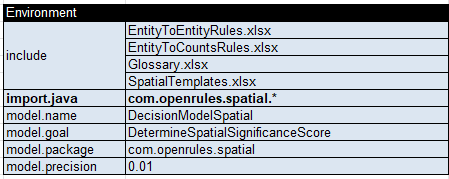
Let’s consider one more standard example “RulesRepository” in which all rules tables deal with the Java object Appl defined in the Java package “myjava.packA1”. Therefore, the proper Environment table inside file Main.xlsx (see above) contains a property “import.java” with the value “myjava.packA1.*”:

The property “import.java” allows you to define all classes from the package following the standard Java notation, for example “hello.*”. You may also import only the specific class your rules may need, as in the example above. You can define a separate property “import.java” for every Java package used or merge the property “import.java” into one cell with many rows for different Java packages. Here is a more complex example:
| Environment | Environment |
|---|---|
| import.static | com.openrules.tools.Methods |
| import.java | my.bom.* |
| import.java | my.impl.* |
| import.java | my.inventory.* |
| import.java | com.openrules.ml.* |
| import.java | my.package.MyClass |
| import.java | com.3rdparty.* |
| include | ../include/Rules1.xlsx |
| include | ../include/Rules2.xlsx |
Naturally the proper jar-files or Java classes should be in the classpath of the Java application that uses these rules.
You can use wildcard characters such as *, ?, or ** to refer to different xls, xlsx, or Java files. For instance, you can write **/*.xlsx to include all Excel files in all subdirectories of your rules repository.
If you want to use static Java methods defined in some standard Java libraries and you do not want to specify their full path, you can use the property “import.static”. The static import declaration imports static members from Java classes, allowing them to be used in Excel tables without class qualification. For example, many OpenRule® sample projects use static methods from the standard Java library com.openrules.tools that includes class Methods. So, many Environment tables have property “import.static” defined as “com.openrules.tools.Methods”. This allows you to write
out(“Rules 1”);
instead of
Methods.out(“Rules 1”);
Java Snippets inside Table “Code”
You can put your Java snippet inside a special table of the type “Code”, e.g.
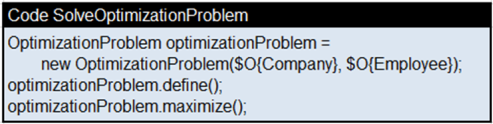
This table is equivalent to the table with the signature
“Method void SolveOptimizationProblem(Decision decision)”.
Executing Decision Model from Java
The decision model “VacationDaysJava” includes different examples of how to invoke the decision model from a Java application.
Running Decision Model against Java Objects
The following Java launcher defined in the class “src/test/java/vacation.days/Main.java” executes the decision model “VacationDaysJava” against a Java object:
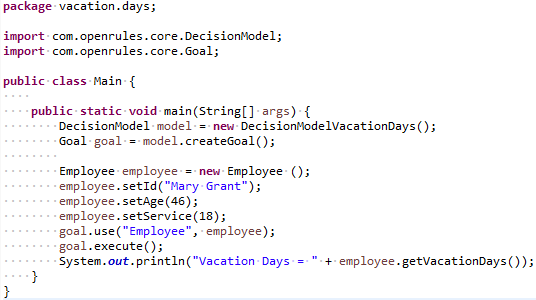
It creates a DecisionModel “model” using the Java class “DecisionModelVacationDays” that was generated during “test.bat”. Then this model creates the “goal”, an instance of the standard class Goal. Then it creates a test-instance of the class Employee, puts this employee to the decision model using the method goal.use(“Employee”, employee), and executes the decision model using the method goal.execute().
If you want to see the trace information in the console, use
goal.put(“trace”,”On”);
If you want to generate an html report, use
goal.put(“report”,”On”);
Running Decision Model against Excel Test Cases
The file “Test.xlsx” includes the following Data table:
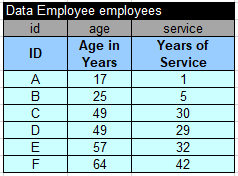
It defines 6 employees. We can use these employees to test our decision model “VacationDaysJava” from Java using the following Java launcher defined in the class “src/test/java/vacation.days/Test.java”:
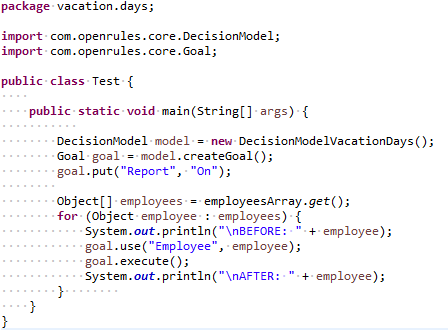
The object “model” and “goal” are defined as in the previous launcher. During the “test.bat”, OpenRules generated a special Java class “emploeesArray” (by adding the word “Array” to the name “employees” used in the above Data table. So, in this launcher we create an array of Java objects “employees” using
Object[] employees = employeesArray.get();
Then it executed the goal for each employee from this array.
Running Decision Model against JSON
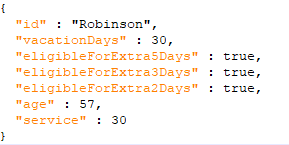
Let’s assume that you have a test employee defined in the file “data/employee.json” in the JSON format:
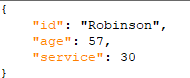
The Java class “src/test/java/vacation.days/MainJSON.java” provides an example how to execute the decision model “VacationDaysJava” against this JSON object:
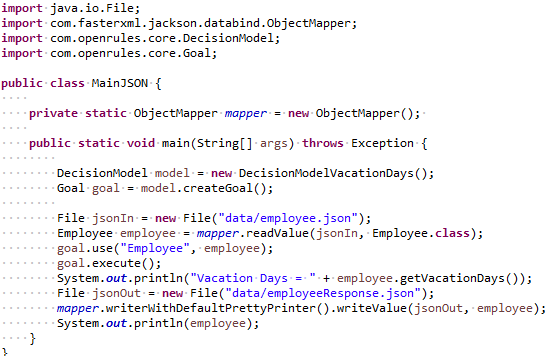
Here we again create a decision model and its goal. Then we use an ObjectMapper that comes with an open-source package “jackson” to convert an object from the file “data/employee.json” to a Java object employee. After executing the decision model for this object, we save the resulting employee in the new file “data/employeeResponse.json”:
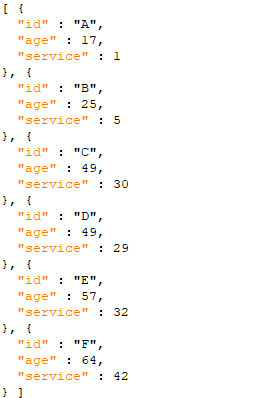
The file “data/Request.json” contains an array of employees in the JSON format:
The Java class “src/test/java/vacation.days/MainJsonArray.java” executes the decision model “VacationDaysJava” for all of them:
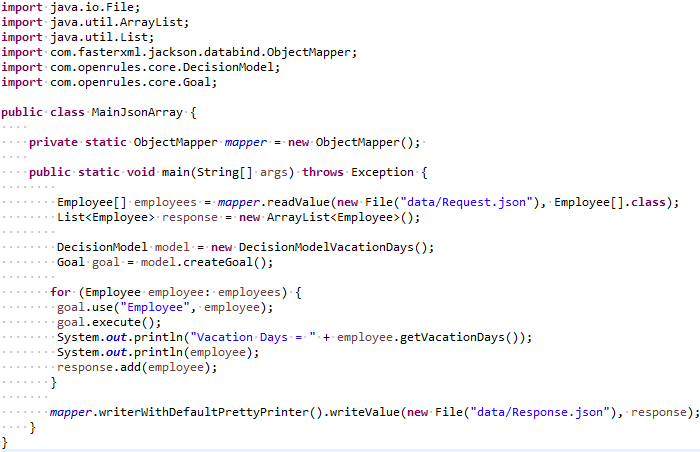
It also saves the calculated results in the file “data/Response.json” as an array of JSON objects.
Code Generation
Build and Compile
When a business analyst executes “test.bat” (or “build.bat”) for the first time or when some files inside the decision project were changed, OpenRules converts the decision model in its Java representation into Java. A business user should not even know about the generated code, but as a developer, you may want to know about the structure of the generated code. Still, you never should make any changes in the generated code!
When OpenRules builds the model by generating executable Java code, it goes through two steps:
-
Build
-
Compile.
OpenRules is trying to catch as many problems as possible during the “Build” step to inform a user about possible errors using business-friendly terms and pointing to the exact place in Excel where an error occurred. However, sometimes the errors could be tricky and only Java compiler will catch them, and in this case you, as a developer, should be able to help by looking at the error in the generated code.
Structure of the Generated Code
The generated code is placed into the folder “target” with 2 major sub-folders:
-
target/generated-sources/main/java – with all Java classes needed to execute the decision model
-
target/generated-test-sources/test/java – with only those Java classes which are based on the test-cases and needed to execute these test cases against the decision model. You don’t need these classes after the decision model is integrated into your IT environment and deployed.
These folders each contain two packages which names are defined by the property “model.package” in the table Environment (see file “DecsionModel.xlsx”). For example, for the project “VacationDays” these folders are:
-
vacation.days – contains an external interface
-
vacation.days.openrules - contains an internal implementation.
The most important generated class is called “VacationDays” located in the package “vacation.days” of the folder “target/generated-sources/main/java”. It is used by the Java tests such as “src/test/java/vacation.days/Main.java” shown in previous sections.
For all business concepts defined in all glossaries, OpenRules will generate the corresponding Java classes. For example, in the project “VacationDays” there is only one business concept “Employee” in the Glossary, so OpenRules will generate Java class “Employee.java” placed in the package “vacation.days” of the folder “target/generated-sources/main/java”.
All rules will have the proper Java representation inside the package “vacation.days.openrules” of the folder “target/generated-sources/main/java”.
There is one more generated folder “target/generated-sources/main/resources” that contains “metadata” files used internally for more efficient rules execution.
Note. When you add OpenRules decision project inside an IDE such as Eclipse, make sure that the project classpath includes the generated folders:
-
target/generated-sources/main/java
-
target/generated-sources/main/resources
-
target/generated-sources/test/java
Logging
OpenRules Decision Manager utilizes the commonly-used open-source package SLF4J™ for logging. By default OpenRules already includes the latest log4j-slf4j-impl but you always may add your preferred implementation by adding the proper dependency in your “pom.xml”, e.g.:
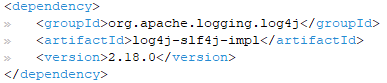
You should also make sure that the standard logging configuration file such as “log4j2.xml” is included in your classpath, e.g. by placing it in the source folder “src/main/resources”.
Execution Path
In many cases, during the build, OpenRules automatically generates the so-called “execution path” as a sequence of all tables that should be executed to calculate the final goal. For example, when OpenRules analyses the decision model “VacationDays”, it automatically builds an execution path as a sequence of goals (or decision tables that determine these goals):
-
SetEligibleForExtra5Days
-
SetEligibleForExtra3Days
-
SetEligibleForExtra2Days
-
CalculateVacationDays
Alternatively, a user may define the execution path manually using the table of the type “Decision”:
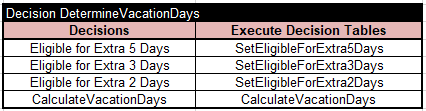
The table “Decision” by default has two columns “Decisions” and “Execute Decision Tables”. The first column contains the display names of all sub-decisions – they simply describe the goals/sub-goals. The second column contains the exact names of decision tables that implement these sub-decisions. The decision table names cannot contain spaces or special characters (except for “underscore”).
To run this “execution path” instead of the automatically defined one you need to modify the property
model.goal=”DetermineVacationDays”
in the Environment table or overwritten in the file “project.properties”. It will produce the same results.
However, some decision models may have a more complex structure when an execution path cannot be automatically built. In this case, the build protocol will include a warning that the same decision variable can be determined by 2 or more decision tables, and OpenRules could not know which of them should be executed first. In such cases, a user should specify the execution sequence in the table of the type “Decision”.
The table “Decision” can use conditions to specify when a certain decision table should and should not be executed. For example, consider a situation when the first sub-decision validates your data and a second sub-decision executes complex calculations but only if the preceding validation was successful. Here is an example of such a decision from the tax calculation decision model “1040EZ”:
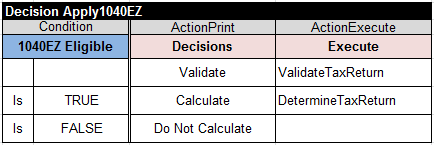
Since this table “Decision Apply1040EZ” uses an optional column “Condition”, we must add a second row with the keywords “Condition”, “ActionPrint”, and “ActionExecute”. This table uses a decision variable “1040EZ Eligible” that is defined by the first (unconditional) sub-decision “Validate”. We assume that the decision “ValidateTaxReturn” should set this decision variable to TRUE or FALSE. Then the second sub-decision “Calculate” will be executed only when “1040EZ Eligible” is TRUE. When it is FALSE, this decision, “Apply1040EZ”, will simply print “Do Not Calculate”.
Note. You may use many conditions of the type “Condition” defined on different decision variables. Similarly, you may use an optional condition “ConditionAny” which instead of decision variables can use any formulas defined on any known objects. It is also possible to add custom actions using an optional action “ActionAny”.
The real-world decision models can be very complex and it might be impossible to automatically discover an execution path, e.g. when the same model has several independent goals that should be determined during the same run. In these cases, the tables of the type “Decision” become very important to express complex inter-goal relationships.
Decision Model Deployment
OpenRules provides all the necessary facilities to simplify the integration of business decision models with modern enterprise-level applications. Tested decision models may be easily deployed on-premise or on-cloud as described in the following schema:
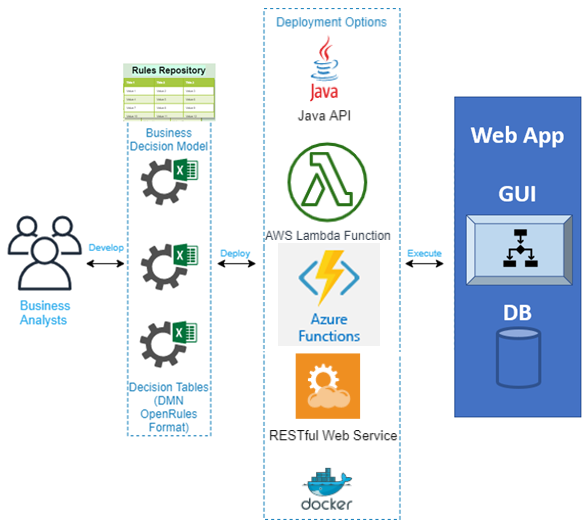
Decision Model Execution Using Java API
After you build and test your decision model, it is ready to be incorporated in any Java-based application using a simple Java API internally generated for this decision model. Examples of a simple Java API for invocation of the decision model can be found in the project “VacationDaysJava” in the folder src/test/java. They uses the generated Java classes saved in the folder “target”.
Invocation API
The sample “SampleJavaEmployee” demonstrates how to invoke a decision service from Java:
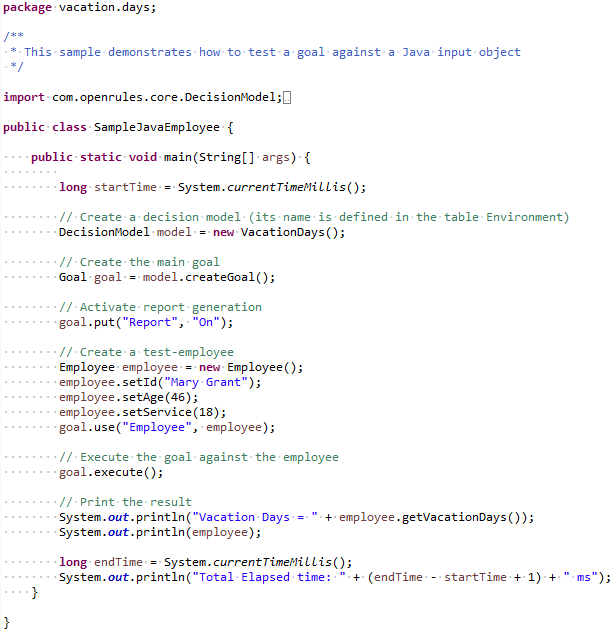
Java classes “com.openrules.core.DecisionModel” and “com.openrules.core.Goal” are the standard OpenRules classes included in the automatically installed OpenRules jar-files. Each decision model generates a special subclass of the DecsionModel such as “VacationDays” when you call “built.bat”. So, in the above code we created an instance of the DecisionModel:
DecisionModel model = new VacationDays();
Then we created a goal the main (default) goal of this decision model:
Goal goal = model.createGoal();
We direct this goal to use some Java objects (such an Employee) by calling the method
goal.use(“business-concept-name”,object);
where business-concept-name should be correspond to the one defined in the Glossary. In this example we create an employee and passed it to the goal:
goal.use(“Employee”,object);
And then we executed this goal by calling
goal.execute();
Then we printed the attribute employees.getVacationDays() modified by our decision model.
Several other sample classes demonstrate how to execute decision model against:
-
test cases defined in Excel – see SampleExcelEmployees
-
test cases read from a Json file – see SampleJsonEmployees.
API for Executed Rules
OpenRules provides a special Java API to allow a Java program (client) to access all executed rules after the goal execution (like those rules which are shown in the generated html-reports). You can find the proper example in the class “SampleShowExecutedRules” of the standard project “VacationDaysJava” – see below.
Before executing the goal, a client may add a new ExecutionListener to the goal: ExecutionListener listener = new ExecutionListener(); goal.addListener(listener); Then after the goal’s execution, a client can ask this listener to show all executed rules using the method listener.getExecutedRules().
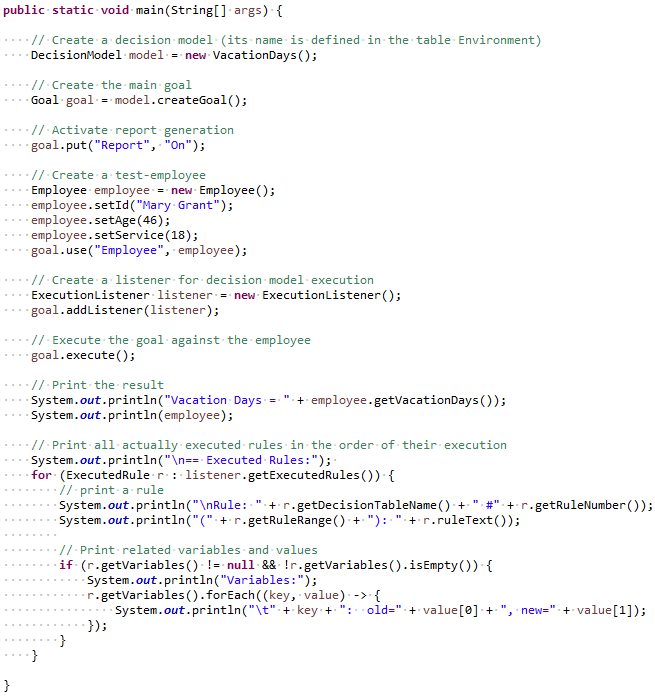
In this case, the executed rules will be displayed as below:
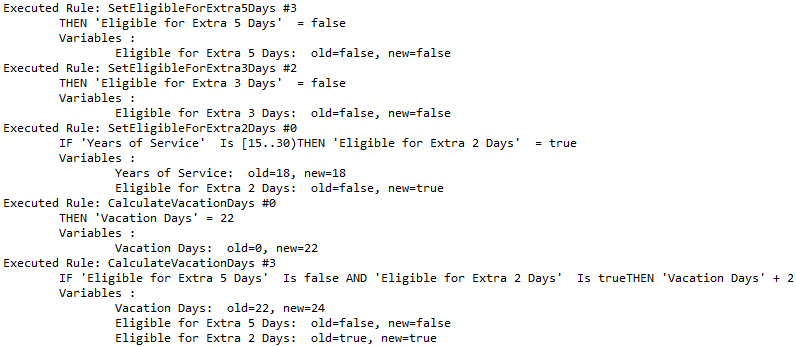
The standard OpenRules class ExecutedRule provides easy access to all rule elements including getDecisionTableName(), getRuleNumber(), getRuleRange(), getConditions(), getActions(), getVariables(), getSourceUri():

To understand how to use these accessors, look at the above printout of the executed rules which was created using the method:
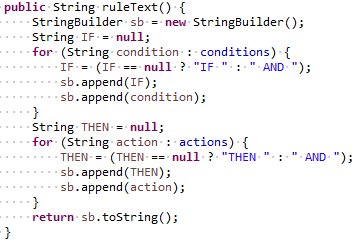
The old and new values for all variables were displayed by analyzing all variables know in the glossary and the map ‘variables” of the type Map<String, Object[]> where the first parameter is a name of the decision variable, and the second parameter is an array of values of this variable before and after the execution.
Note. ExecutionListener should not be used in production mode as it impacts the performance of the rule engine
Deploying Decision Model as AWS Lambda Function
AWS Lambda functions are among the most popular deployment options for modern microservices.
Configuring AWS Lambda
To do AWS deployment, you should already have an active AWS account and define your security credentials (access key ID and secret access key) which should not be shared with anybody.
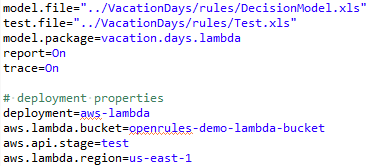
Let’s consider how to deploy the introductory decision model “VacationDays” as an AWS Lambda function. Look at the standard project “VacationDaysLambda” to learn how to do it:
- Add additional properties to the configuration file “project.properties”: Note that this project uses the same rules repository that was created in the project “../VacationDays”. The property “aws.lambda.bucket” defines a new or existing AWS S3 bucket name.
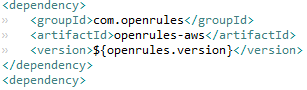
- Make sure that your file “pom.xml” includes the dependency to “openrules-aws”:
Deploying AWS Lambda
Double-click on the provided file “deployLambda.bat”.
The decision model will be deployed, and the console log will show the invoke URL for the deployed decision service also known as “endpoint URL” (highlighted in the following example):
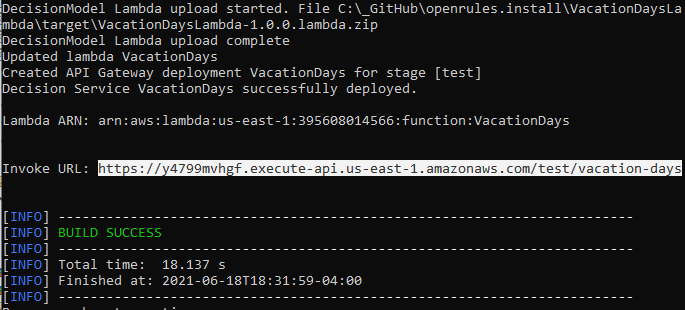
By default, the name of the generated web service is created based on the property “model.name”. In this case the name “VacayionDays” was automatically converted tp “vacation-days”. If you want to use your own name, you may define the property “model.endpoint”. e.g. if you define
model.property=custom-vacation-service
then the generated endpoint will look as http://localhost:8080/custom-vacations-service
If you previously deployed your model as a Lambda function, it is possible that sometimes you will receive the following error:
“AWS lambda deployment failure: The statement id (gw-lambda) provided already exists. Please provide a new statement id, or remove the existing statement.”
In this case, you need to run the provided “undeployLambda.bat” and try again.
Testing AWS Lambda
If your model includes test cases (usually defined in the Excel file “Test.xlsx” as defined by the property “test.file”), then OpenRules generates several files to simplify testing of your decision service deployed as an AWS Lambda function. You can test your service using:
-
Automatically generated Java tests
-
Generated JSON interfaces with POSTMAN.
Auto-generated Java Test
When you execute “deployLambda.bat” (or “buildLambda.bat”) OpenRules generates the file “testLambda.bat” that already includes the above “invoke URL”. When you click on this file, it remotely executes ALL test cases defined in the Excel file “Test.xlsx” against just deployed AWS Lambda!
Auto-generated JSON Test Cases for POSTMAN
When you execute “build.bat” (or “test.bat”), OpenRules generates JSON files created from test cases defined in the Excel file “Test.xlsx”. The generated JSON files are placed into the folder “jsons” one file for each test case.
You may use these JSON files to test your Lambda with the commonly used POSTMAN. The proper POSTMAN’c view is shown below:
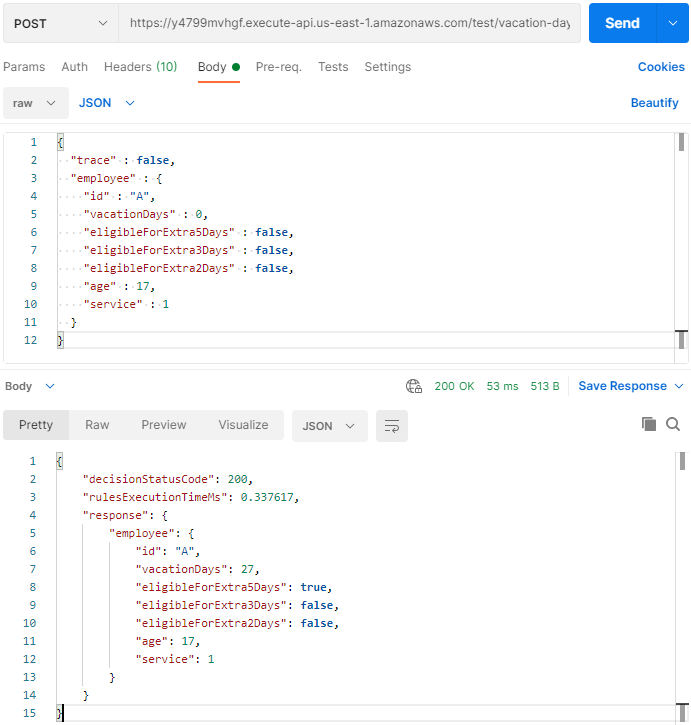
Here we placed the endpoint URL (saved in the file “testLambda.bat” into the URL field afte the “Post”. In the filed request Body we used the following JSON test:
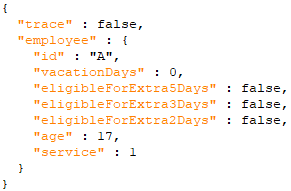
It was copied from the generated file “jsons/testCases-Test A.json”. You can try to run this POSTMAN yourself by pushing the button “Send”. After executing this Lambda several times, you will see that a pure execution time on the AWS cloud for any test is less than 1 millisecond, while based on your connection speed the round-trip time with sending a request and receiving a response takes on average around 45 milliseconds.
Executing AWS Lambda in Batch Mode
Sometimes, for efficiency reason, you may want to combine several JSON requests in one batch to execute them together. OpenRules automatically generates such a batch in the file “jsons/testCasesBatch.json”. To execute this batch from POSTMAN, you can place the content of this json file into POSTMAN body and use the same endpoint URL. If your batch array includes many elements, you will see an essential performance improvement to compare with one-by-one execution.
AWS Lambda Settings
Optionally, you may use additional settings to specify more details about your AWS deployment preferences. For example, by default, we use the word “test” (inside the invoke URL) as your deployment stage. But you may redefine it as “dev”, “prod”, or any similar word using this setting:
aws.api.stage=test
By default, your deployed service will be publicly accessible, but it is possible to make it private. Usually, people keep their AWS Credentials (access key ID and secret access key) in the default file ~/.aws/credentials. However, alternatively, you may define them directly in the file “project.properties”:
aws.access.key.id=
NOTE 1. If you receive error messages that you don’t have enough authorizations to deploy and run your AWS Lambda function, contact your IT department and request that your AWS user role has permissions to read and modify API Gateway resources, to create and modify IAM roles, and full access to AWS Lambda API.
NOTE 2. If you decide to undeploy your decision service and clean up your AWS, just click on the file “undeployLambda.bat“.
Building AWS Lambda for AWS Pipelines
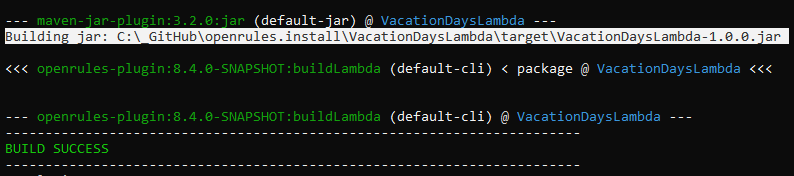
Nowadays enterprises configure their AWS Lambda functions using various tools and frameworks for continuous integration and continuous delivery (CI/CD). Instead of relying on “one-click” deployment with “deployLambda.bat” they may prefer to use existing CI/CD pipeline configured by their IT department. In this case, OpenRules can package the lambda’s code as a zip file that can be uploaded to their AWS environment and configured following their software delivery pipeline. OpenRules plugin has a goal ‘openrules:buildLambda’ that can be used to generate such a zip file. You can invoke the plugin in your build script or you can use ‘buildLambda.bat’. Here is an example of the execution protocol:
Deploying Decision Model as MS Azure Function
[MS Azure Function](https://azure.microsoft.com/en-us/services/functions/?&efid=CjwKCAjwiLGGBhAqEiwAgq3qgmHY0Q1L1v8POwLpp1pdPDZ0rDwNWLBimaREfZx0UoEP87JfAhoCZhAQAvDBwE:G:s&OCID=AID2100131SEMCjwKCAjwiLGGBhAqEiwAgq3qgmHY0Q1L1v8POwLpp1pdPDZ0rDwNWLBimaREfZx0UoEP87JfAhoCZhAQAvDBwE:G:s&gclid=CjwKCAjwiLGGBhAqEiwAgq3qgmHY0Q1L1v8POwLpp1pdPDZ0rDwNWLBimaREfZx0UoEP87JfAhoCZhAQAvDBwE) is another popular deployment option for modern microservices.Configuring MS Azure Function
You may read the guide “Azure Functions for Java Developers” to learn how to install and use MS Azure.
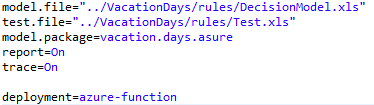
Let’s consider how to deploy the introductory decision model “VacationDays” as Azure function. Look at the standard project “VacationDaysAzure” to learn how to do it:
- Add additional properties to the configuration file “project.properties”: Note that this project uses the same rules repository that was created in the project “../VacationDays”.
-
All Azure properties are defined in the file “pom.xml”.
-
Its properties include: Please pay attention to
element above. The value is a name of the Azure function and must be globally unique. It means that when you try to run the VacationDaysAzure sample you have to change the function name.

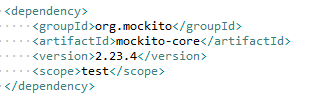
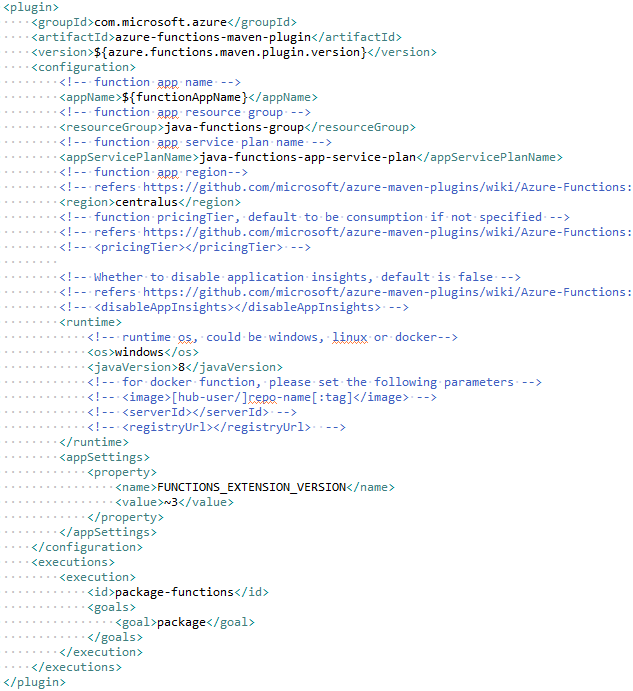
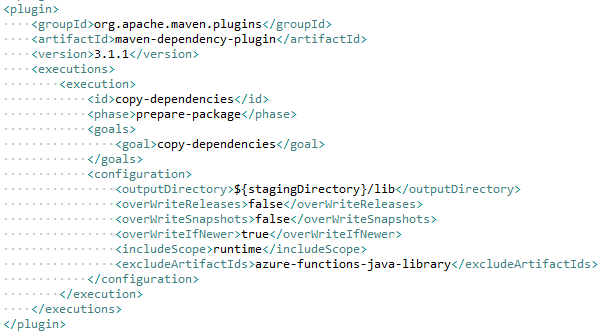
- You need these dependencies:

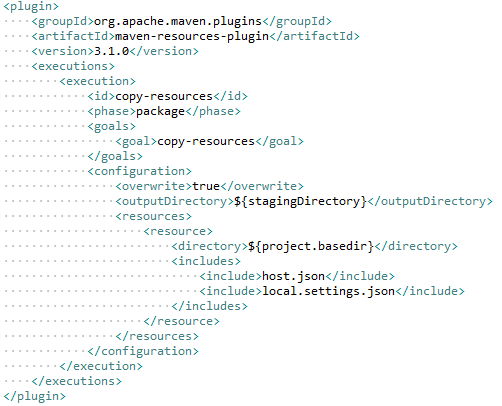
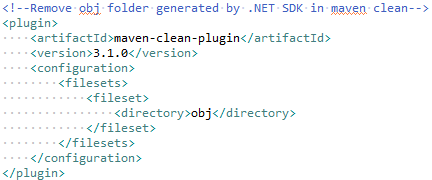
- You need a plugin similar to this one:
Azure Function local testing
First run “package.bat’ that builds azure function, then, after a successful build, double-click on the provided file “runLocalServer.bat”
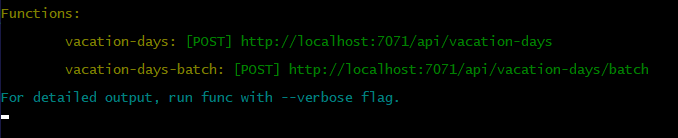
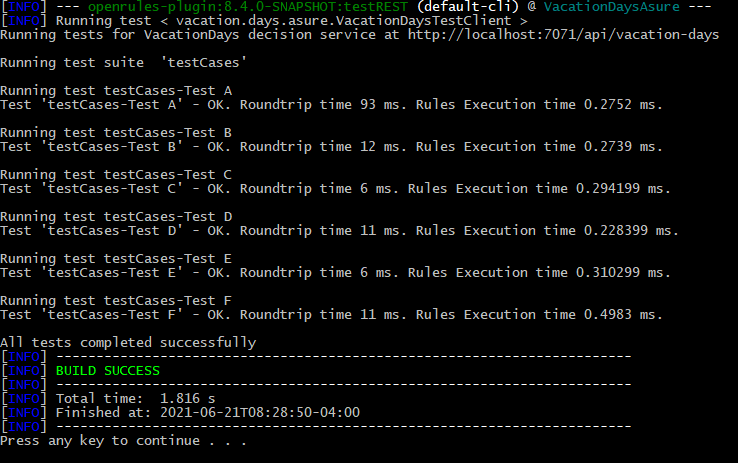
Now, you can run an automatically generated tests using testLocalServer.bat
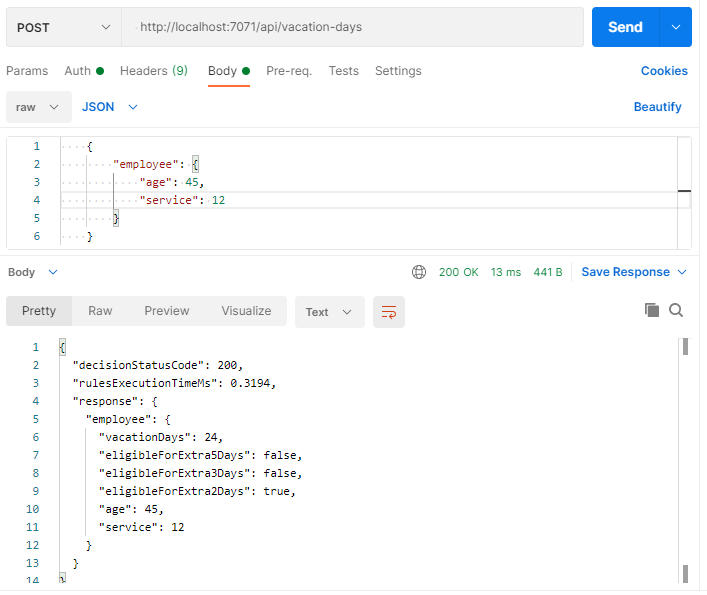
You can also use POSTMAN and json samples from ‘jsons’ folder to run the tests:
Deploying Azure Function
Double-click on the provided file “deployFunction.bat”.
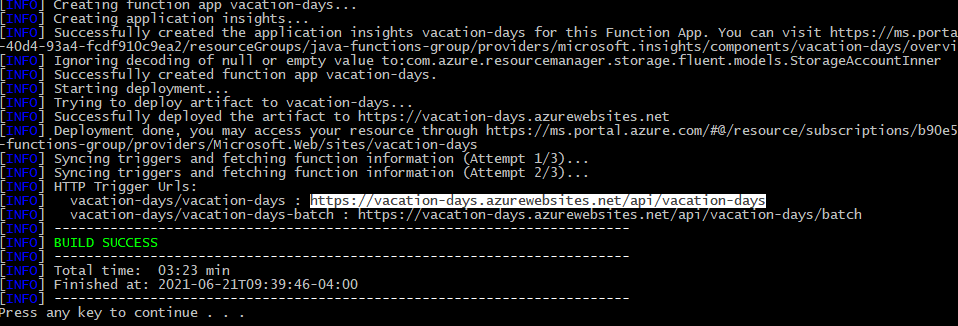
The decision model will be deployed, and the console log will show the invoke URL for the deployed decision service (highlighted in the following example):
Testing Azure Function
After successful Azure Function deployment, copy the function URL - highlighted in above view. You can use this URL in POSTMAN to run the same test you ran when you worked with local deployment.
Deploying Decision Models as RESTful Web Services
OpenRules provides powerful while simple mechanisms for the deployment of business decision models as RESTful web services. You may choose between two deployment options for the creation of RESTful decision services:
-
OpenRules REST – a lightweight implementation that utilizes Undertow
-
SpringBoot – an implementation that utilizes SpringBoot.
We will explain how to use these approaches to convert our business decision model “VacationDays” into a RESTful Web Service that can accept HTTP requests at http://localhost:8080/vacations-days and will respond with proper responses in the JSON format.
Creating RESTful Decision Service
The sample project “VacationDaysRest” demonstrates the simplest way of deploying the decision model “VacationDays” as a RESTful web service. Its configuration file “project.properties” looks as follows:
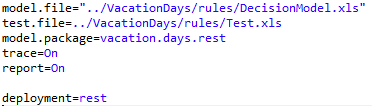
As you can see, it uses the same rules repository “../VacationDays/rules” with the deployment type defined as “rest”.
Building RESTful Decision Service
OpenRules created a special Maven plugin “openrules:packageRest” that converts a decision model to a RESTful web service. As usual, the batch file “build.bat” included in the project “VacationDaysRest” will build the decision model and test it against the provided Excel test cases. However, it also will generate the file “VacationDaysRest-1.0.0.jar” in the folder “target”:
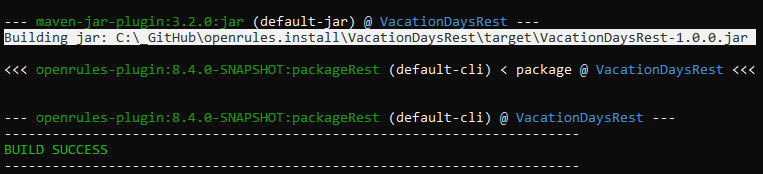
Additionally, “build.bat” generates JSON files created using test cases defined in the Excel file “Test.xlsx”. The generated JSON files are placed into the folder “jsons” one file for each test case.
Testing RESTful Decision Service
OpenRules also created a special Maven plugin “openrules:runRest” that can be used to run the generated RESTful service on the local server. The standard batch file “runLocalServer.bat” (or “runLocalServer” on Mac/Linux) can start that the service using the OpenRules REST server on port 8080:
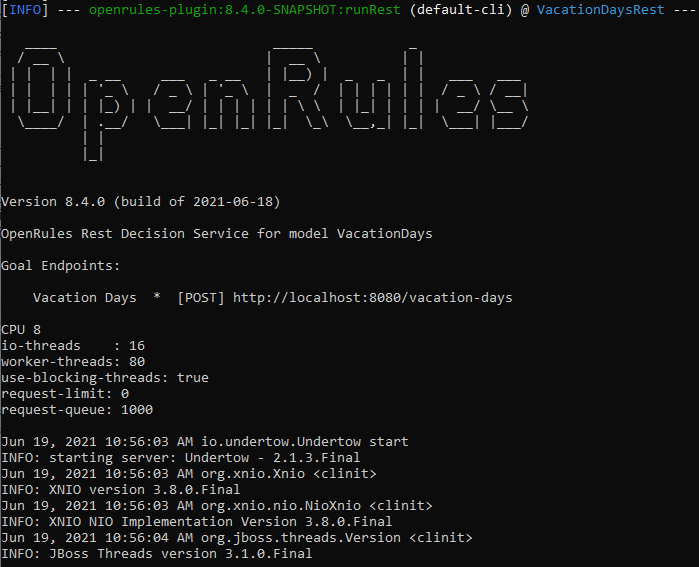
OpenRules also created a special Maven plugin “openrules:testRest” that can be used to test the generated RESTful service using Excel-based test cases by invoking them using the automatically generated class “vacation.days.rest.VacationDaysTestClient”. It can be invoked using the Maven command:
mvn openrules:testREST -DtestClassName=vacation.days.rest.VacationDaysTestClient-DtestUrl=http://localhost:8080/vacation-days
For convenience, OpenRules provided the batch file “testLocalServer.bat” that executes this command. When you run this command, it will produce:
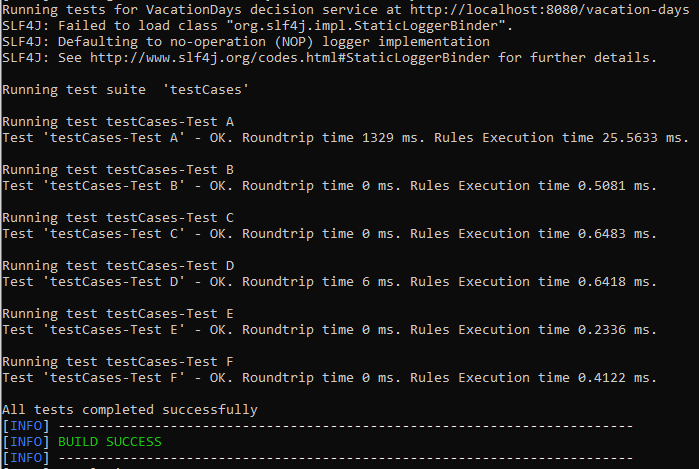
Executing Auto-generated JSON Test Cases from POSTMAN
Instead of “testLocalServer.bat” you may test this RESTful decision service with POSTMAN. The proper POSTMAN’c view is shown below:
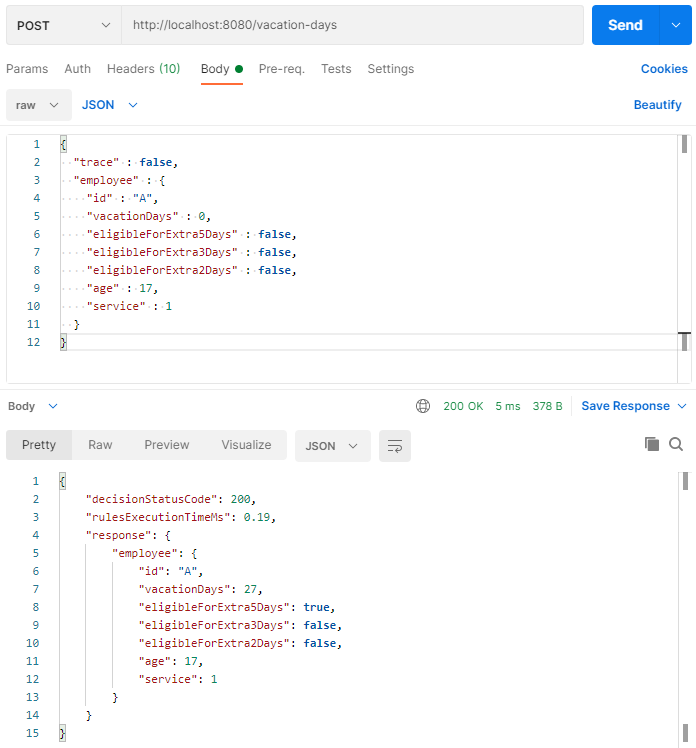
Here we use http://localhost:8080/vacation-days as the endpoint URL and the generated JSON test from the generated file “jsons/testCases-Test A.json”.
Executing RESTful Service in Batch Mode
The above POSTMAN sample shows the execution of one JSON request. Sometimes, for efficiency reason, you may want to combine several JSON requests in one batch to execute them together. OpenRules also generates such a batch in the file “jsons/testCasesBatch.json”. To execute this batch from POSTMAN, you can place the content of this json file into POSTMAN body and add to the endpoint URL the suffix “/batch”. If your batch array includes many elements, you will see an essential performance improvement to compare with one-by-one execution.
Case Sensitivity of JSON Attributes
You also may control the case sensitivity of JSON attributes by adding the property “json.naming” in your file “project.properties”. By default, the attribute names follow the standard JavaBeans naming convention for JSON properties. However, if you add the property
json.naming=same_as_glossary
JSON properties will use the same names as specified in the Glossary, e.g. the property “employee” can start with a capital letter.
Creating RESTful Decision Service with SpringBoot
Mmm
Support for SpringBoot 3 and JDK 17+. Based on multiple requests, we now allow our customers to build OpenRules-based microservices using SpringBoot, both version 2.x and SpringBoot 3.x. SpringBoot-3 is backward incompatible with SpringBoot-2 and requires Java 17+ and “jakarta” instead of “javax“.
OpenRules Release 11.0.0 maintains backward compatibility by automatically recognizing which JDK and SprinBoot versions are being used and generating the proper Java code. The standard installation OpenRules 11.0.0 allows our customers to choose the preferred version of SpringBoot (if any) using the following sample projects:
-
VacationDaysSpringBoot (for SpringBoot 3.1.0)
-
VacationDaysSpringBoot2 (for the old SpringBoot 2.7.13)
-
VacationDaysSpringBootSecure (for SpringBoot 3.1.0)
-
VacationDaysSpringBootSecure2 (for the old SpringBoot 2.7.13)
See an implementation example of “SecurityConfig.java” in the projects “VacationDaysSpringBootSecure” and “VacationDaysSpringBootSecure2”.
Thus, with release 10.* OpenRules supports all JDK starting from 1.8 and higher, and all SpringBoot versions.
bbb
The sample project “VacationDaysSpringBoot” demonstrates how to deploy the decision model “VacationDays” as a RESTful web service using SpringBoot-3 which requires JDK version 17+. If you want to use SpringBoot-2 with earlier versions of JDK (like Java 1.8) you may look at another project “VacationDaysSpringBoot2”.
Its configuration file “project.properties” looks as follows:
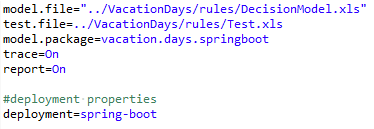
As you can see, it uses the same rules repository “../VacationDays/rules” with the deployment type defined as “spring-boot”.
Building RESTful Decision Service
The project “VacationDaysSpringBoot” has a special “pom.xml” that includes “dependencies” and “plugins” provided by SpringBoot. As usual, the batch file “build.bat” will build the decision model and test it against the provided Excel test cases. However, it will also generate the file “VacationDaysSpringBoot-1.0.0.jar” in the folder “target”:
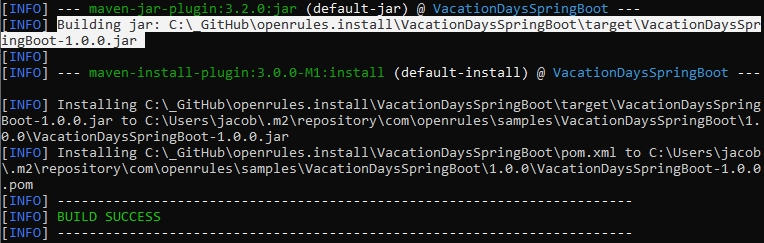
Additionally, “build.bat” generates JSON-files converted to the JSON format from the Excel format using test cases defined in the Excel file “Test.xlsx”. The generated JSON-files are placed into the folder “jsons” one file for each test case.
Testing RESTful Decision Service
For this project OpenRules relies on the standard Maven plugin “spring-boot:run” that can be used to run the generated RESTful service on the local server. The standard batch file “runLocalServer.bat” (or “runLocalServer” on Mac/Linux) can start the generated RESTful service on the local server using SpringBoot:
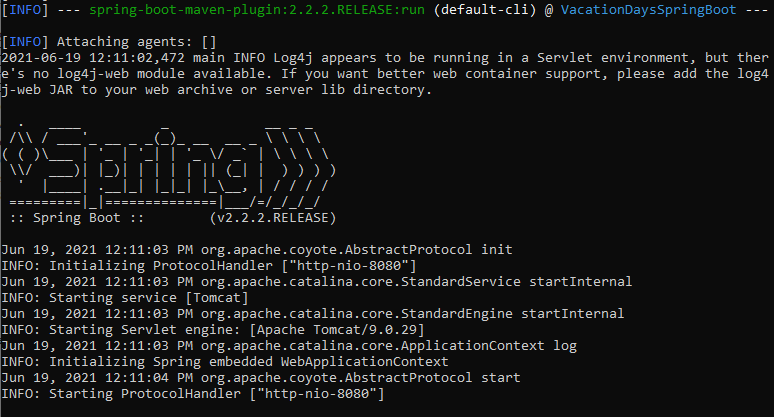
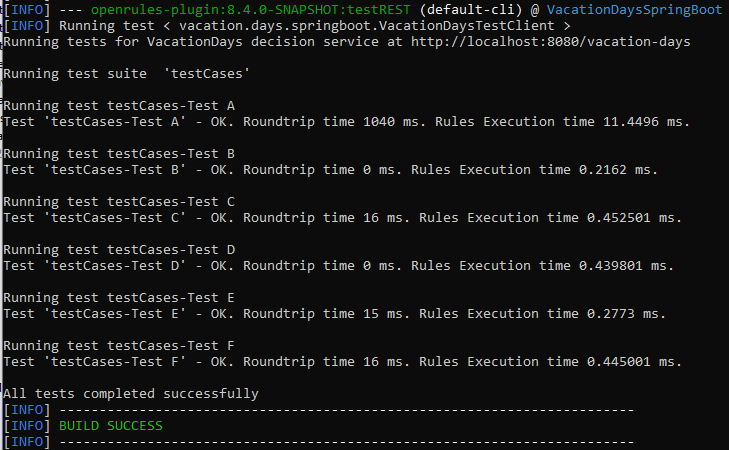
OpenRules created a special Maven plugin “openrules:testRest” that can be used to test the generated RESTful service using Excel-based test cases by invoking them using the automatically generated class “vacation.days.rest.VacationDaysTestClient”. It can be invoked using the Maven command:
mvn openrules:testREST -DtestClassName=vacation.days.springboot.VacationDaysTestClient-DtestUrl=http://localhost:8080/vacation-days
For convenience, OpenRules provided the batch file “testLocalServer.bat” that executes this command. When you run this command, it will produce:
Executing Auto-generated JSON Test Cases from POSTMAN
Instead of “testLocalServer.bat” you may test this RESTful decision service with POSTMAN. The proper POSTMAN’c view is shown below:
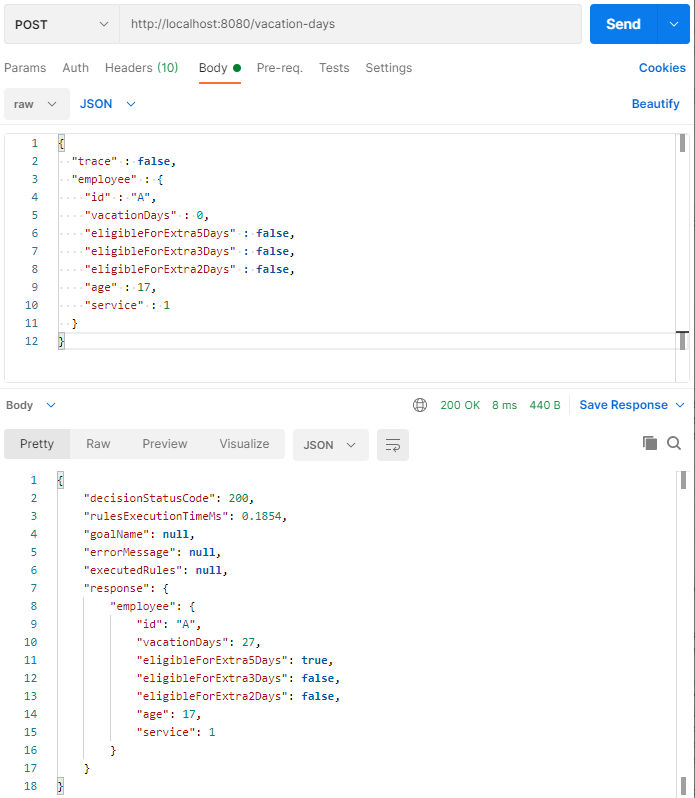
Here we use http://localhost:8080/vacation-days as the endpoint URL and the generated JSON test from the generated file “jsons/testCases-Test A.json”.
Executing RESTful Service in Batch Mode
The above POSTMAN sample shows the execution of one JSON request. Sometimes, for efficiency reason, you may want to combine several JSON requests in one batch to execute them together. OpenRules also generates such a batch in the file “jsons/testCasesBatch.json”. To execute this batch from POSTMAN, you can place the content of this json file into POSTMAN body and add to the endpoint URL the suffix “/batch”. If your batch array includes many elements, you will see an essential performance improvement to compare with one-by-one execution.
SpringBoot Decision Services with Additional Security
The standard installation OpenRules 11.0.0 include two more sample project that demonstrate how to use additional security:
-
VacationDaysSpringBootSecure (for SpringBoot 3.1.0)
-
VacationDaysSpringBootSecure2 (for the old SpringBoot 2.7.13)
The key difference between these projects (beside pom.xml files) can be seen in the implementation of the “SecurityConfig.java”.
Packaging Decision Models as a Docker Image
You can similarly and easily package our RESTful web service as a Docker image whether you use project “VacationDaysRest” or “VacationDaysSprinBoot”.
Building Docker Image
First of all, you need to install and start your Docker Desktop. Then you may execute the standard batch file “buildDocker.bat” (or “buildDocker” on Mac/Linux) that will package your RESTful web service as a Docker image. Internally it utilizes Google Container Tool “Jib” which is a Maven plugin for building Docker images for Java applications. When you run “buildDocker.bat” it will automatically download install all necessary files and will create a Docker image.
Running Docker
Then you may switch to a command line and enter
docker images
It will show all docker images that may look as below:

To start our Docker to serve different requests on the local port 8080, we need to enter the following command:
docker run -ti -p 8080:8080 vacation-days
Alternatively, we may use “runDocker.bat”.
The start of the container will look as follows:
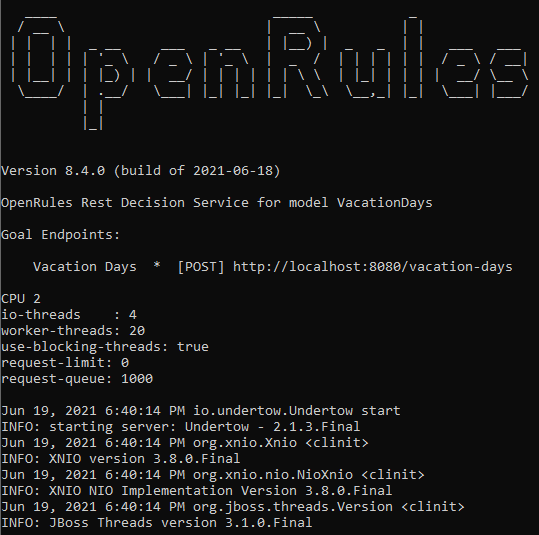
This container will wait for requests on port 8080.
Testing Docker from POSTMAN
Now we can use POSTMAN with the endpoint URL http://localhost:8080/vacation-days to send a test request:
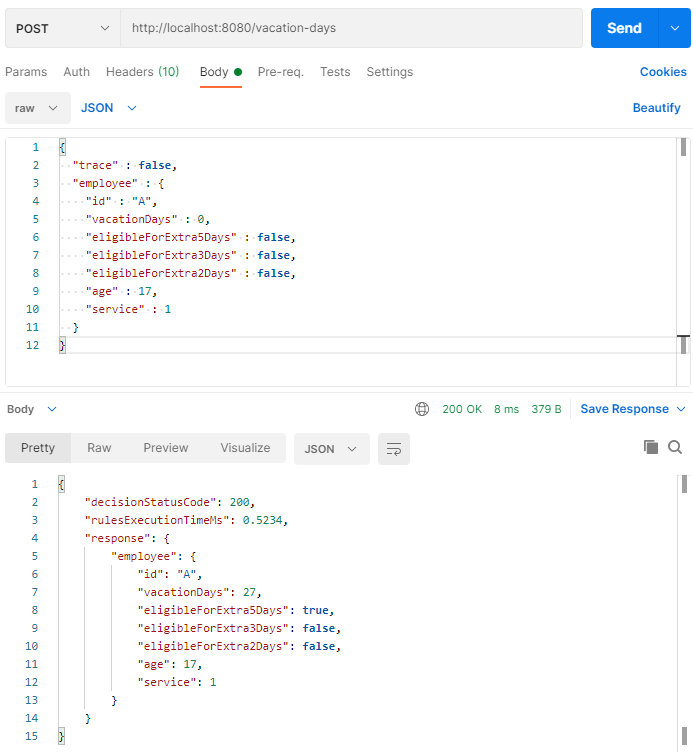
The console will show that our POSTMAN’s request was executed against our Docker image:
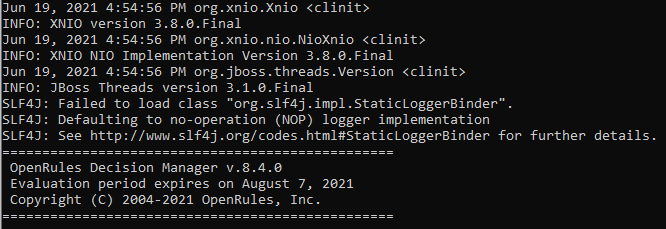
You may check running Docker images:
docker ps

You may stop a running image:
docker kill e46319a43d1b
So, this example demonstrates how the OpenRules-based decision model can be deployed as a Docker container and be executed locally.
Exporting Docker Image
Now we are ready to export our Docker image. From command line enter command:
docker images

You may save this image “b064f2da0ed1”:
docker save b064f2da0ed1 >vacation-days.image
The generated file “vacation-days.image” can be used with any of the following container registries:
-
Google Container Registry (GCR)
-
Amazon Elastic Container Registry (ECR)
-
Docker Hub Registry
-
Azure Container Registry (ACR).
It can be done by your software developers following this manual.
Using Docker Image on a 3rd party Machine
To install this image on any machine with already running Docker Desktop, you may use the following command:
docker load -i vacation-days.image
docker images (to see the image ID)
docker tag
vacation-days
docker run -p 8080:8080 -t vacation-days
Then we started POSTMAN with URL http://localhost:8080/vacation-days and the above JSON request.
Comparing OpenRules REST and SpringBoot Deployment Options
Both deployment options (OpenRules REST and SpringBoot) create RESTful decision services with minimal overhead for user experience. The OpenRules REST option creates a smaller package and in some cases shows better performance than SpringBoot with Tomcat. As you see below, the generated jar files for the RESTful service have quite different sizes:
-
VacationDaysRest-1.0.0 – ~6Mb
-
VacationDaysSpringBoot-1.0.0 ~19Mb
Both options works very well for serving REST based decision services. You can choose either option based on your preferences and expertise.
Additional Deployment Properties
The file “project.properties” may include additional deployment:
-
model.endpoint – it allows you to define custom names for your deployed decision services. You also may define this property in the Environment table.
-
jackson.default-property-inclusion – it can take the following values:
-
non_null – the default value meaning only variables with non-null values will be included in the decision service response
-
always meaning all variables will be always included in the decision service response independently of their values (of course, unless they are specified as ‘out‘ in the Glossary column “Used As”)
-
non_default meaning only variables with non-default values will be included in the decision service response. The default values for numbers are 0, for Booleans – false, and String – “”, and for all other types – null
-
non_empty similar to non_null but additionally it will ignore empty String variables.
- jackson.default-object-inclusion – it can take the following values:
-
non_null – the default value meaning only objects that contain non-null properties will be included in the decision service response
-
always meaning all objects with at least one ‘out‘ property (even if it is null) will be included in the decision service response.
- jackson.serialization.write_dates_as_timestamps – it allows you to change the default way for presentation of dates in the generated JSON files and in the decision service response:
-
true – the default value meaning all Dates will be represented as numbers of milliseconds since January 1st, 1970
-
false – all Dates will be represented using a more user-friendly Date timestamp defined by ISO 8601 such as 2021-08-22T17:05:27+00:00.
- json.naming – it can take the following values:
-
default – uses the standard Jackson naming convention for JSON properties
-
same_as_glossary – JSON properties use the same names as specified in the Glossary.
Rules-based Service Orchestration
OpenRules provides business users with abilities to build and deploy operational decision microservices. It empowers business users with an ability to assemble new decision services by orchestrating existing decision services independently of how they were built and deployed. The service orchestration logic is a business logic too, so it’s only natural to apply the decision modeling approach to orchestration. To orchestrate different services you may create a special orchestration decision model that describes under which conditions such services should be invoked and how to react to their execution results.
OpenRules decision tables have special action-columns of the type “ActionExecute” that is usually used to execute different services upon certain conditions without worrying how they were implemented and deployed. To describe such external services OpenRules added a special new table “DecisionService“. You may download a special workspace “openrules.loan” that implements a library of decision services described in the Loan Origination example from the DMN Section 11.
The workspace “openrules.loan” constains several decision models with two main goals “BureauStrategy” and “Routing” deployed as external decision services:
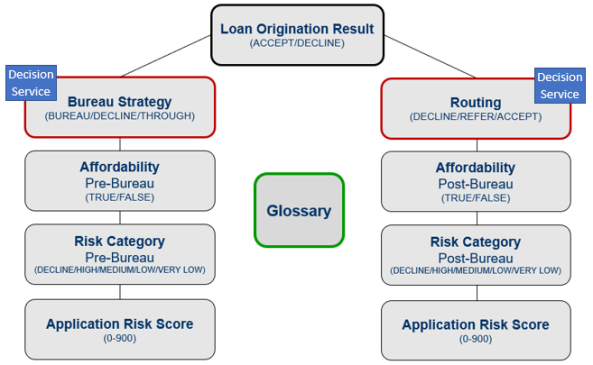
The high-level goal “Loan Origination Result” is an example of the orchestration decision models.
If you open this decision model in OpenRules Explorer, it will be displayed using et following diagram:
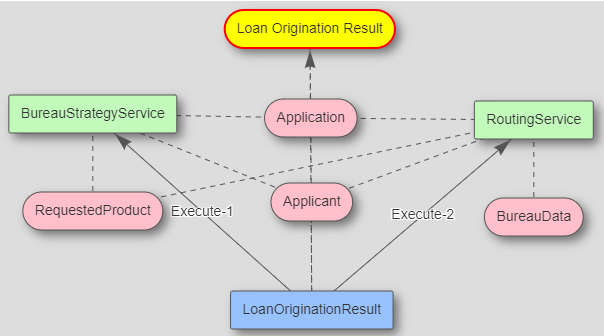
This decision model is not aware of the internal structure of these two decision services which are shown as green rectangles. However, we can see the decision table “LoanOriginationResult” that invokes these services and business concepts (pink rounded rectangles) used by these services.
The orchestration logic here is relatively simple:
Execute decision service “BureauStrategy” that should determine the goal “Bureau Strategy”. If Bureau Strategy is DECLINE, then set Loan Origination Result to DECLINE, and stop. If Bureau Strategy is not DECLINE, then execute decision service “Routing” that will determine the goal “Routing”. If Routing is DECLINE, then set Loan Origination Result to DECLINE. If Routing is REFER, then set Loan Origination Result to REFER. If Routing is ACCEPT, then set Loan Origination Result to ACCEPT.
This logic can be naturally presented in the following table:
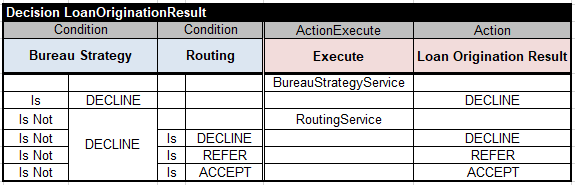
Here the third column “ActionExecute” may execute two decision services: “BureauStrategyService” and “RoutingService”. The actual implementation of these services is described in the following table:

The column “Service Type” defines these services as REST web services and provides their endpoints – in this particular case both services were deployed as AWS Lambda functions, the default OpenRules deployment destination (it was done with an instant click). The table “DecisionService” may have the 4th (optional) column
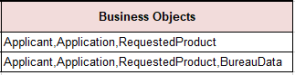
that describes the parameters of each service that correspond to the business concepts defined in eth common Glossary. If the column “Business Objects” is omitted (like in the above table), all business objects will be passed to all decision services even if “BureauStrategyService” doesn’t need BureauData.
Along with REST web services, OpenRules supports other types of services. For example, you may get essentially faster execution by taking advantage of the fact that your services are deployed as AWS Lambdas by using their ARN addresses as endpoints:

If your decision services are deployed as AWS Lambda functions you even don’t have to provide the complete ARN addresses, and can simply write their names as in the following table:

OpenRules will automatically expand the name like “BureauStrategy” to “arn:aws:lambda:us-east-1:395608014566:function:BureauStrategy”.
Another supported type of services is regular Java classes automatically generated by OpenRules from decision models:

You also may invoke any static Java method, e.g. use Service Type “JavaMethod” and Service Endpoint “loan.origination.EmailService:send” to send an automatically generated email to the Applicant.
Useful Tools
Generating OpenRules Tables in Excel
Sometimes our customers want to generate OpenRules tables in Excel programmatically, e.g. when they use their own GUI for rules creation and edeiting. OpenRules includes a simple Java API for generation of the standard decision tables. It is called ExcelGenerator and has several convenient methods.
To add a new decision table, use

To add a simple Glossary use

To add any array of strings to a separate sheet use

To save these tables into an Excel file use

Here is an example:
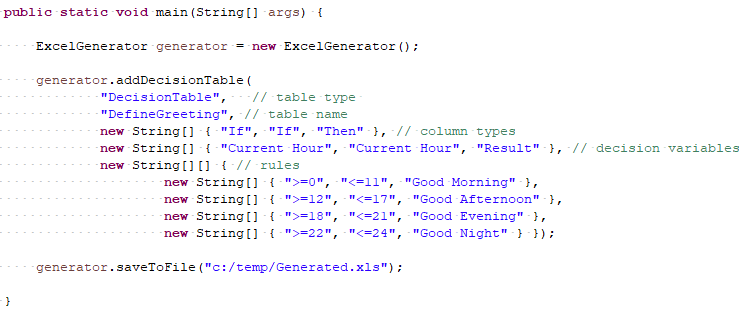
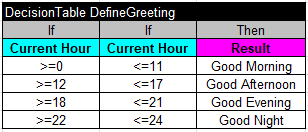
This code will generate fdile “Generated.xlsx” with one decision table:
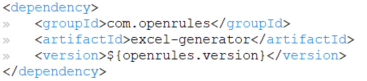
To use this API inside your Java program, you only need to add the following dependency to your pom.xml:
Contact support@openrules.com is you want to learn more about ExcelGenerator or to expand its functionality.
Search and Edit Multiple Excel Files
OpenRules users will find that a free tool called “IceTeaReplacer” can be very useful for doing search&replace in OpenRules repositories. Here is a functional description from their old website:
IceTeaReplacer is a simple, yet a powerful tool to search inside multiple Microsoft’s Office Word (doc, docx), Excel (xls, xlsx) files within a directory (and it’s subdirectories) and replace provided phrase. Options available:
-
Perform search before replacing
-
Match whole word only
-
Ignore word case
-
Do backup before replace
-
Deselect files on which you don’t want to perform replace.
Here is an example of its graphical interface:
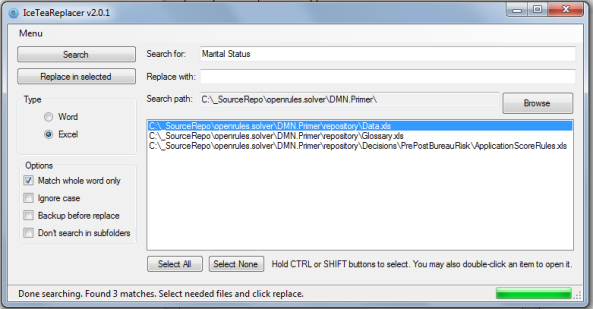
It seems that IceTeaReplacer” website is not available anymore. However, as it was freely available awhile ago without any limitations for its use and distribution, you may send a request to support@openrules.com and we may share a link for its download.
Technical Support
Direct all your technical questions to support@openrules.com or this Discussion Group. Read more at http://openrules.com/services.htm.