
Introductory decision model
Decision Model “Hello”
A compact first model that greets a customer using the time of day, gender, marital status, and name.
Business logic
Turn a few facts into a complete greeting.
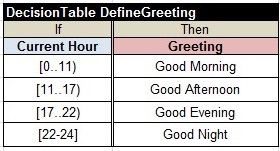
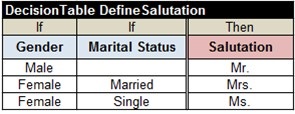
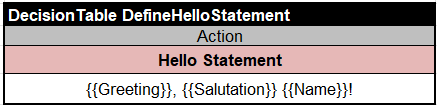
For example, when Robinson is a married woman and the current time is 14:25, the decision model returns “Good Afternoon, Mrs. Robinson!”
- Greeting determines “Good Morning,” “Good Afternoon,” or another time-appropriate value.
- Salutation determines “Mr.,” “Ms.,” or “Mrs.” from gender and marital status.
- Hello Statement combines the greeting, salutation, and customer name.
Model in Excel
Keep the glossary and every goal visible.
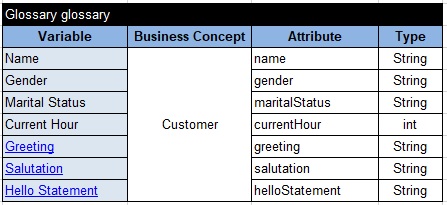
The model consists of a business glossary surrounded by decision tables for its three goals. The glossary defines each decision variable’s business name, business concept, technical name, and type.
OpenRules recognizes a table by a keyword such as Decision, DecisionTable, or Glossary. Merged cells in the first row mark its width, while the last non-empty row marks its end.
Test and explain
Verify expected greetings before integration.
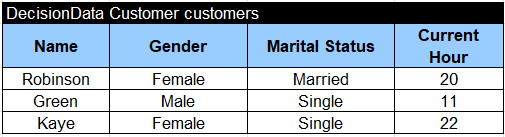
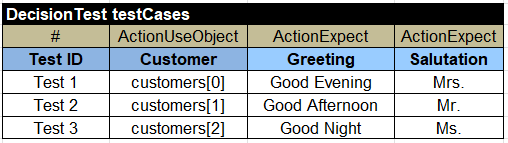
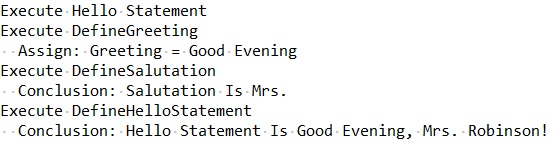
Excel data tables define test customers, and test-case tables define the expected results. Running test.bat resolves the model dependencies, generates executable code, and evaluates every test case.
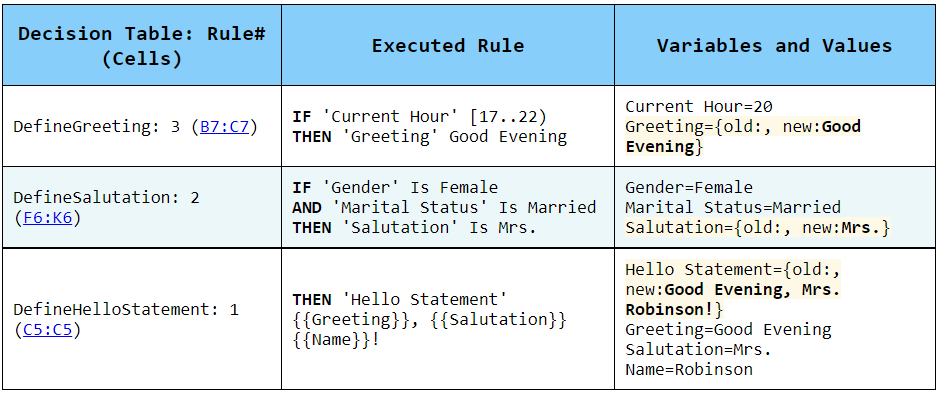
The generated HTML report shows which rules ran and explains why the model produced each result.
Java integration
Call the tested goal from an application.
The generated DecisionModelHello class lets a Java application create the Hello Statement goal, supply a Customer object with goal.use("Customer", customer), and execute it with goal.execute().
Customer [name=Robert Smith, gender=Male, maritalStatus=Single, currentHour=15, helloStatement=Good Afternoon, Mr. Robert Smith!]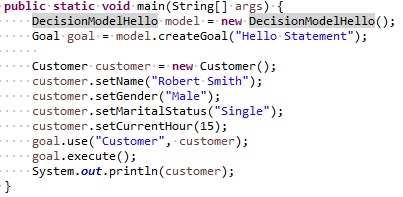
Try the model yourself
Download OpenRules and run the samples.
The evaluation includes working decision projects that you can inspect, test, debug, and adapt.