
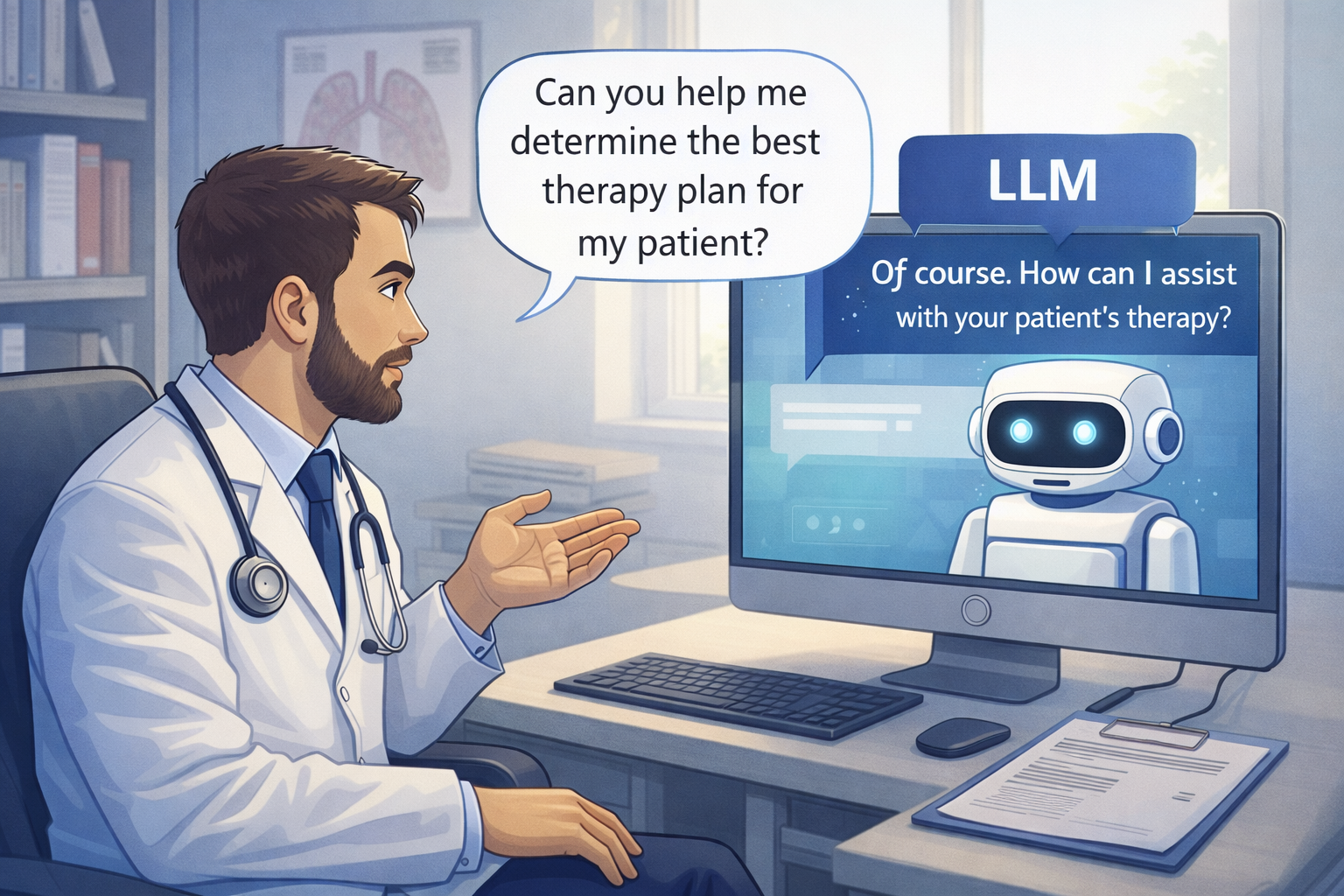
DMCommunity.org April 2026 Challenge that aims to explore how LLMs orchestrate rule-based decision services. It describes three loosely coupled medical services that an LLM can use to help a physician determine the appropriate therapy for a patient with Acute Sinusitis. Below, we describe how OpenRules builds these services and automatically makes them AI-ready, enabling a natural, user-friendly dialogue between a physician and an LLM.
- Decision Logic for Three Services
- General Considerations
- Deploying Decision Services
- Doctor-LLM Dialogue
- Service Implementations
- Conclusion
Decision Logic for Three Services
Determine Medication and Dosing
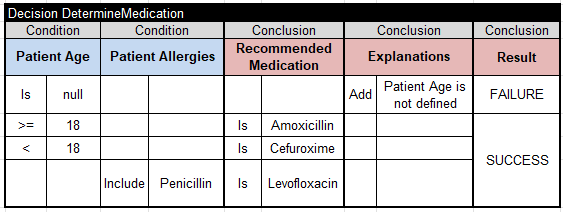
- If the patient is 18 years old or older, the therapy of choice is Amoxicillin.
- If the patient is younger than 18, the therapy of choice is Cefuroxime.
- If the patient is penicillin-allergic, the therapy of choice is Levofloxacin.
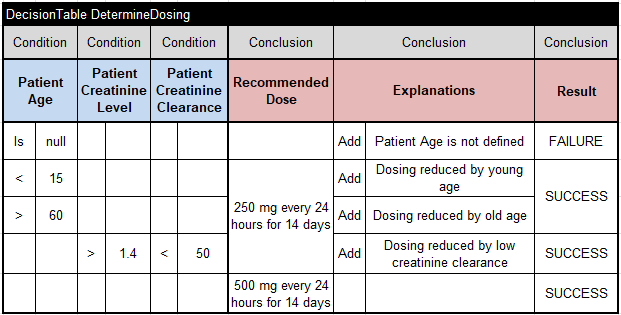
- For patients between 15 and 60, the dose is 500 mg every 24 hours for 14 days.
- For patients younger than 15 or older than 60, the dose is 200 mg every 24 hours for 14 days.
- If the patient’s creatinine level (PCr) > 1.4 and creatinine clearance (CCr) < 50, the dose is 200 mg every 24 hours for 14 days.
Determine Creatinine Clearance
Creatinine clearance (CCr) should be calculated using this formula:
CCr [ml/min] = ((140 – age) × Lean Body Weight [kg] )/ (PCr × 72)
Drug Interaction Rules
Check if the patient is on active medications. If so, check for possible conflicts between recommended and active medications using the file ConflictingMedications.csv. All detected conflicts should generate the appropriate warnings.
Tell your LLM to use these three decision services when answering any therapy request for a patient with Acute Sinusitis. Here is a possible request:
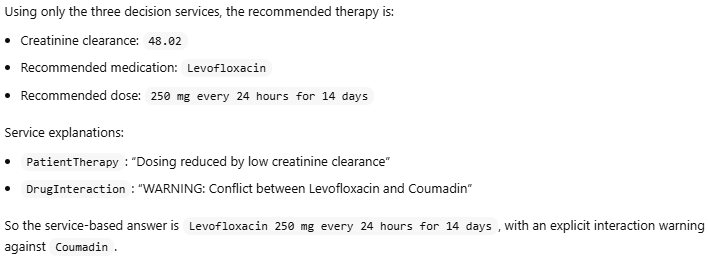
“I have a patient diagnosed with Acute Sinusitis. He is 58 years old, weighs 78 kg, and has a creatinine level of 1.85. Keep in mind that he is Penicillin-allergic and takes Coumadin.“
Each of these three services can be easily implemented using any rules-based product and deployed as RESTful decision services or MCP servers. We will describe the actual implementations of these three services at the end of this post. However, their implementations are much less important than the communication and orchestration logic.
Let’s concentrate on how our patient therapy services will communicate with the end user, in this case, a physician. Consider these questions:
- Do we always need to request all input variables or just the necessary ones?
- Should we always precalculate Creatinine Clearance before deciding on dosing?
- Should we even bother with the third service if the patient is not on active medications?
Although these three services are loosely coupled, they must still work together. Decision models typically need to capture the full orchestration logic. How has this been done so far?
- One approach is to use traditional decision tables — for example, see how OpenRules users (primarily business analysts) represent such logic in practice.
- Service orchestration has often been implemented via custom graphical interfaces that let users choose which business function and underlying decision service to invoke next.
- Workflow and BPM tools are another viable option.
- For relatively simple decision models, where each goal and sub-goal is defined by a single decision table, it is possible to automatically determine the service ordering and execution, rather than requiring users to strictly specify which rules should be executed after which. For example, see how OpenRules does it for the simplified version of this challenge.
LLMs, however, are fundamentally changing the way decision services can be orchestrated. While they may not yet be suitable for making high-stakes decisions autonomously, they already enable end users to interact with existing decision services in a natural, flexible way. When deployed decision services expose their own descriptions — including their inputs and outputs — an LLM can analyze this information and automatically invoke the appropriate services, guiding the interaction through a plain English conversation with the user.
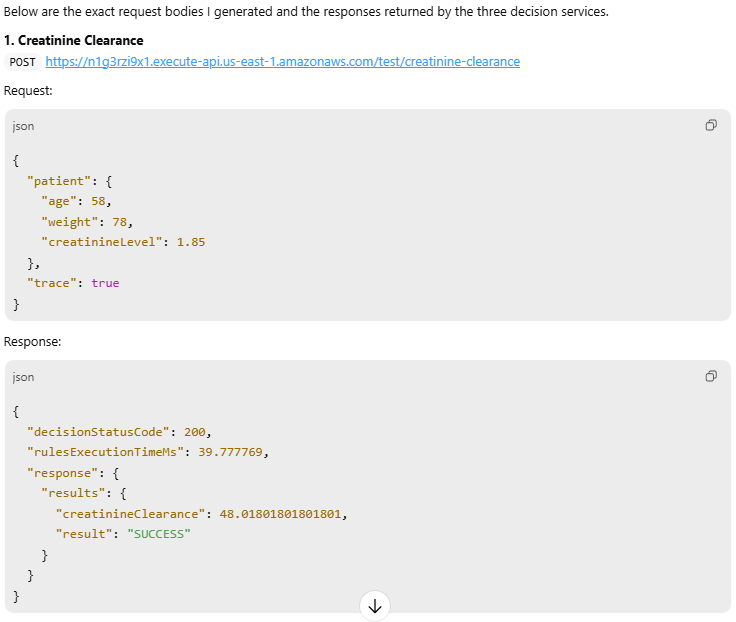
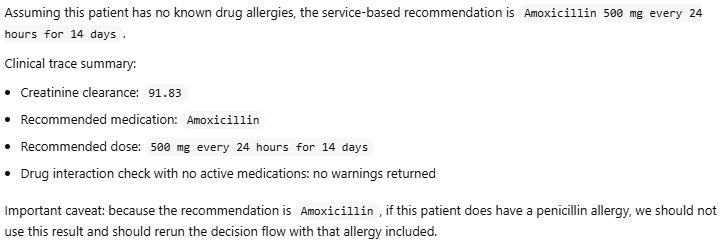
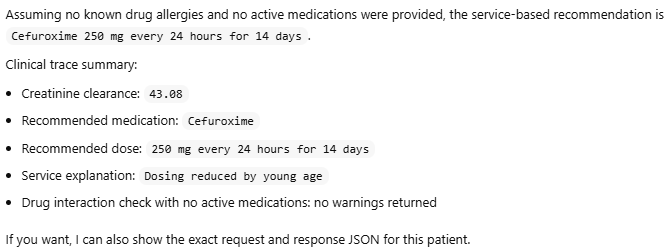
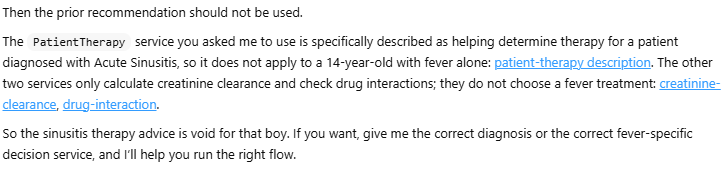
To illustrate, consider the following dialogue with ChatGPT, in which it plays the role of a physician determining the appropriate therapy for different patients diagnosed with Acute Sinusitis.
Before starting the dialogue, we implemented and tested each of the three decision services separately (see below), then deployed them as AWS Lambda functions at the following endpoints:

Deployed OpenRules decision services are already AI-friendly as they include their own description in the automatically generated files “description.md” and “schema.json”. And the user doesn’t even have to look at these files, as they are prepared for an LLM.
Let’s choose the ChatGPT desktop app, which provides a simple graphical interface for managing AI agents. It can be accessed via chatgpt.com by selecting “…More + Codex.” Similar desktop applications are also available from Claude and Gemini.
The initial interface appears as shown below, allowing us to enter commands or questions and view the LLM’s responses.

In the dialogue below, human requests have a gray background and the LLM’s responses have a white background.
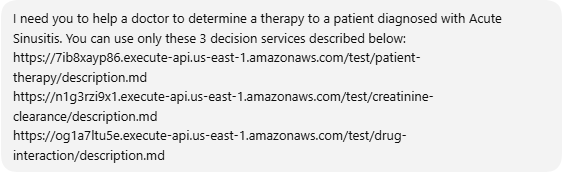
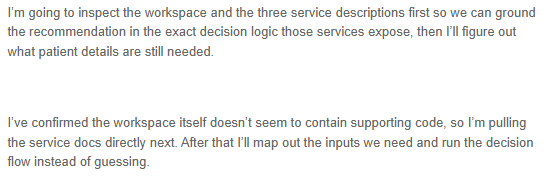
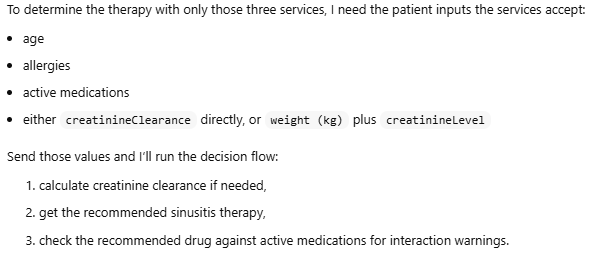







These decision models are available in openrules.samples/AI/PatientTherapy.
Service “Determine Medication and Dosing”
- If the patient is 18 years old or older, the therapy of choice is Amoxicillin.
- If the patient is younger than 18, the therapy of choice is Cefuroxime.
- If the patient is penicillin-allergic, the therapy of choice is Levofloxacin.
- For patients between 15 and 60, the dose is 500 mg every 24 hours for 14 days.
- For patients younger than 15 or older than 60, the dose is 200 mg every 24 hours for 14 days.
- If the patient’s creatinine level (PCr) > 1.4 and creatinine clearance (CCr) < 50, the dose is 200 mg every 24 hours for 14 days.
Here is the glossary:
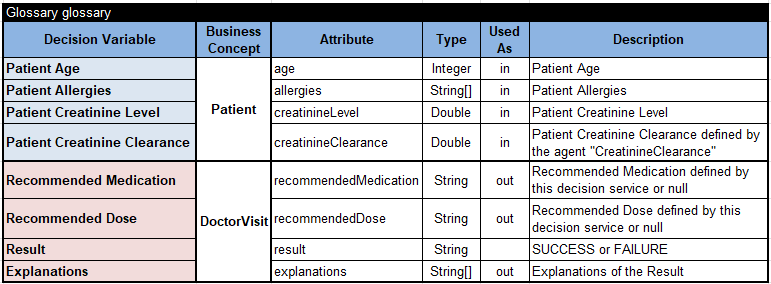
The main goal “DetermineTherapy”

invokes these two main decision tables:
Service “Determine Creatinine Clearance”
Creatinine clearance (CCr) should be calculated using this formula:
CCr [ml/min] = ((140 – age) × Lean Body Weight [kg] )/ (PCr × 72)
It is implemented using this glossary
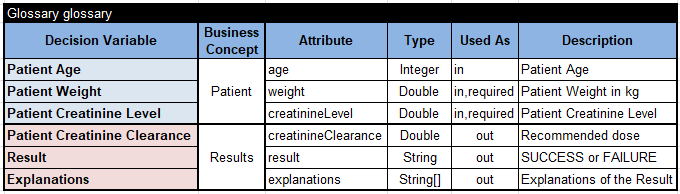
and this decision table:
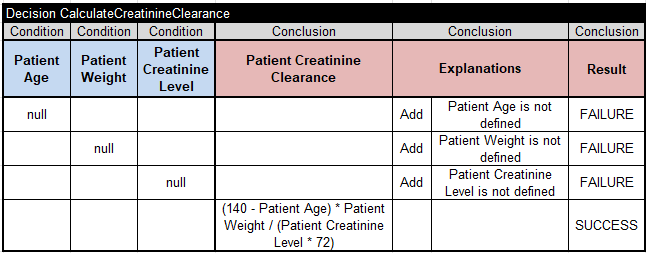
Service “Drug Interaction Rules”
Check if the patient is on active medications. If so, check for possible conflicts between recommended and active medications using the file ConflictingMedications.csv. All detected conflicts should generate the appropriate warnings.
This service uses this glossary:
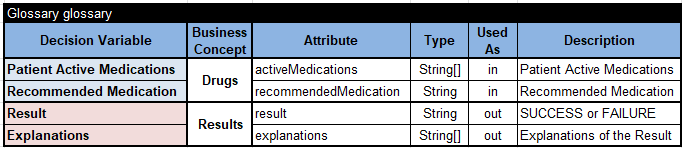
It executes the decision table “CheckDruhInteraction”, which iterates over all “Patient Active Medications”:
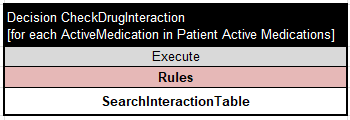
For each ActiveMedication it executes the decision table “SearchInteractionTable”:
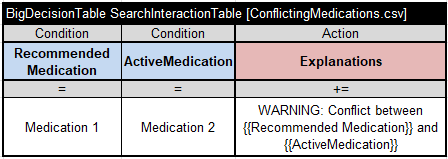
If it finds the pair “RecommendedMedication – ActiveMedication” in the CSV file “ConflictingMedications.csv”, it adds the appropriate warning to the “Explanations” array. Note that we use a table of type “BigDecisionTable“, which guarantees fast search even for files with hundreds of thousands of records.
Conclusion
This experience confirms that LLMs are fundamentally transforming the orchestration of decision services. They already enable end users to interact with existing decision services in a natural, flexible way — without any custom-built interfaces or rigid workflows. When deployed decision services expose their own descriptions, including their inputs and outputs, an LLM can analyze this information and automatically invoke the appropriate services, guiding the entire interaction through a plain English conversation with the user.