
Container Deployment
Docker Images and Containers
Build a portable container from a tested OpenRules decision service without having to manually configure the underlying container build toolchain.
Container workflow
Package the same operational service for any registry.
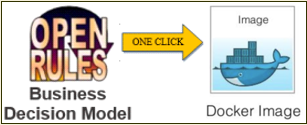
Begin by converting the decision model into a RESTful web service. Start Docker Desktop, then run buildDocker.bat to package the service as an image.
Publish that image through Google Container Registry, Amazon Elastic Container Registry, Docker Hub, or Azure Container Registry. OpenRules uses Google’s Jib container tool internally, shielding model developers from its lower-level configuration.
The included VacationDaysRest and VacationDaysSpringBoot projects can both be used to build Docker images. Additional implementation details are available in the local User Manual for Developers.
Deployment options
Choose the integration that fits your architecture.
Each option uses the same business-owned OpenRules decision model.
Invoke a compiled model from Java.
Open guide →02AWS LambdaDeploy a serverless AWS function.
Open guide →03MS Azure FunctionPublish a model as an Azure Function.
Open guide →04RESTful Web ServicesRun with OpenRules REST or Spring Boot.
Open guide →05SharePoint IntegrationMaintain rule repositories in SharePoint.
Open guide →06Amazon S3 IntegrationLoad rule files directly from S3.
Open guide →07Docker ContainersPackage services as portable containers.
Open guide →08Apache SparkUse OpenRules from Spark applications.
Open PDF ↗09WAR FilesDeploy to Tomcat, WebSphere, and other servers.
Open guide →Build and deploy
Try these deployment projects yourself.
The free evaluation includes ready-to-run decision models that you can build, test, and adapt.