
Problem. The problem was defined at https://dmcommunity.org/challenges/2024-07-smart-investment/ as Challenge July-2024:
Problem Definition. Let’s start with the glossary:
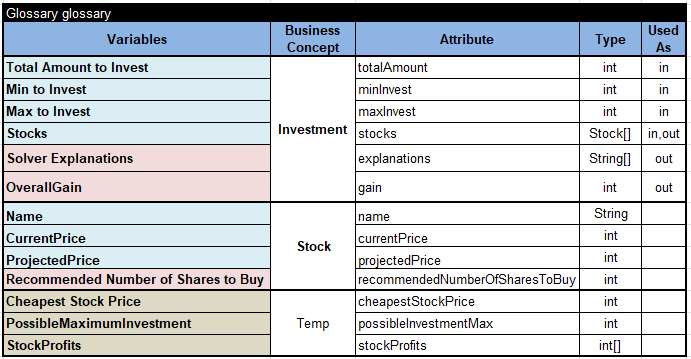
Here we used the business concept “Investment” which refers to our input data such as “Total Amount to Invest”, “Min to Invest”, “Max to Invest”, and our only output variable “OverallGain.” Each Investment contains the array “Stocks” of the type Stock[] where each Stock is defined by its Name, CurrentPrice, and ProjectedPrice.
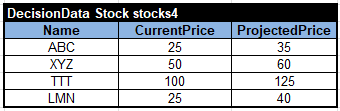
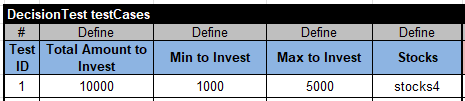
Here is a test case:
Defining Decision Variables
For this problem, key constrained (unknown) variables represent how many stocks we want to purchase. Their values vary from 0 to a possible maximum investment. So first, we should define and calculate an intermediate decision variables “PossibleMaximumInvestment” and “Cheapest Stock Price”:

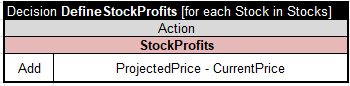
We also will need an array “StockProfits” that includes projected profit/loss for each stock:
Now, we are ready to define our unknown variables for each stock that represent how many stock items we recommend purchasing. We will use the Rule Solver column “SolverCreate” to do that and the column “SolverAddVariableToArray” to create an array of these Solver variables “StockVariables”:

The {{Name of Stock}} tells the Solver to use the actual name of the current stock (and not the words “Name of Stock”). The domain “0-{{PossibleMaximumInvestment}}” will be replaced with the proper value for each stock, from 0 to PossibleMaximumInvestment.
Then we will define the investment variables for each stock, post constraints on them to limit them by “Min to Invest” and “Max to Invest”, and add them to the array “StockInvestmentVariables”:

Then we will define the Solver variable for “OverallStock”
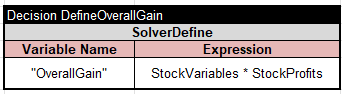
and post a constraint that it should not exceed “Total Amount to Invest”
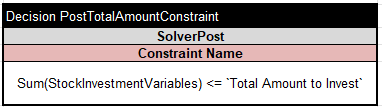
This table
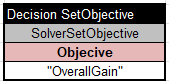
will set “OverallGain” as our optimization objective.
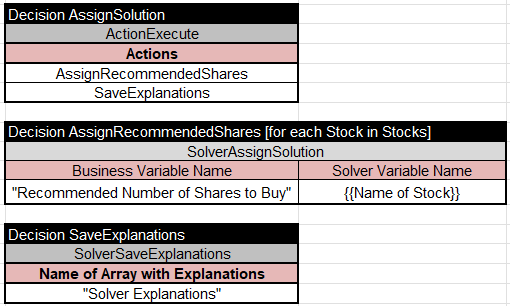
When Rule Solver finds an optimal solution, we will use the following tables to assign it back to our business output variable:
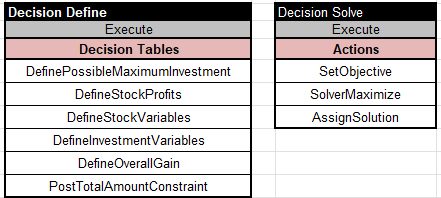
Here are the top-level tables “Define” and “Solve” that invoke the above tables:
Rule Solver will find the following optimal solution:
Solution #9:
- ABC[120] XYZ[20] TTT[10] LMN[200]
- ABCInvest[3000] XYZInvest[1000] TTTInvest[1000] LMNInvest[5000]
- OverallGain[4650]
*** Execution Profile *** Number of Choice Points: 1533 Number of Failures: 1522 Execution time: 65 msec