

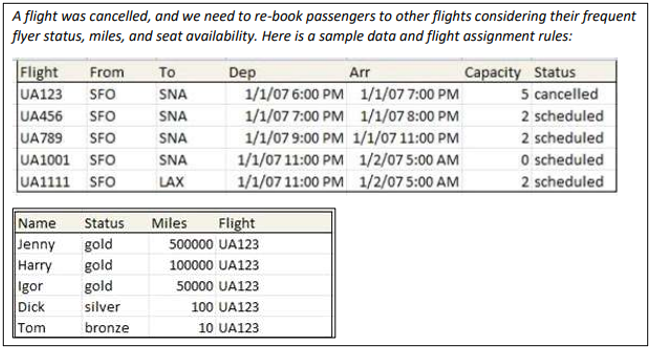
Rule Solver can be used to build declarative decision models. This example describes a solution for one of the most complex decision modeling challenges “Flight Rebooking” offered by DMCommunity.org:
Procedural Approach
Most of the submitted solutions (including OpenRules) were based on a procedural approach and used different implementations of this greedy algorithm:
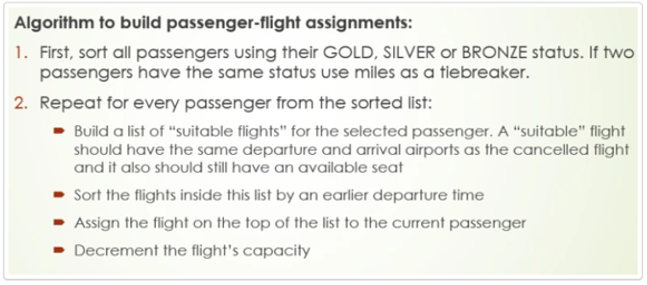
This procedural approach forces the decision model to concentrate on “HOW” and use traditional programming means like sorting inside nested loops. Besides, it does not guarantee that the recommended decision will be the best one. We will follow the alternative declarative approach described below:
Declarative Approach
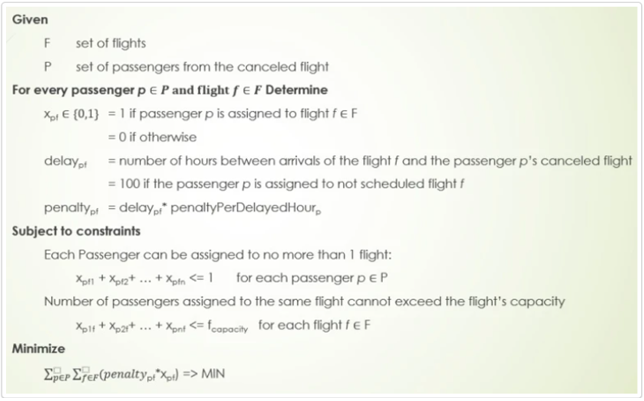
This approach focuses on “WHAT” rather than “HOW”. It introduces an unknown variable xpf for each passenger “p” and each flight “f” which can take the value 1 (p assigned to f) or 0 otherwise. It associates penaltypf with each potential assignment of “p” to “f” that can be defined based on a passenger’s frequent flier status, miles, and potential delay. It will post two types of constraints:
- Assignment constraints: guarantee that each passenger will be assigned to no more than one flight.
- Capacity constraints: passenger-flight assignment should not exceed flight capacities.
The objective of the proper decision model is to minimize the total penalty specified as a sum of penalties for assignments of passengers and flights.
Let’s start with the Glossary for our Business Problem, which contains arrays of Flights and Passengers:
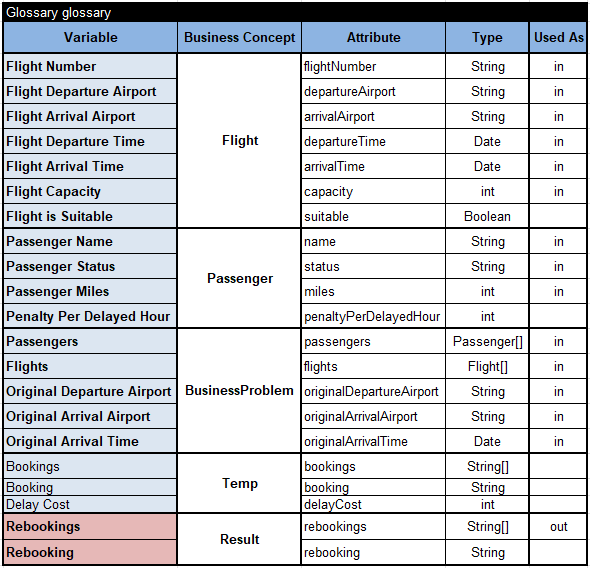
We want our decision model to produce the Result in the array “Rebookings” that will define pairs Passenger-Flight. The glossary contains a few temporary variables that we will use for intermediate calculations.
We will rely on the standard Rule Solver decision “DefineAndSolve” that will invoke two sub-decisions “Define” and “Solve”.
PROBLEM DEFINITION
The sub-decision “Define” consists of 6 sub-decisions:
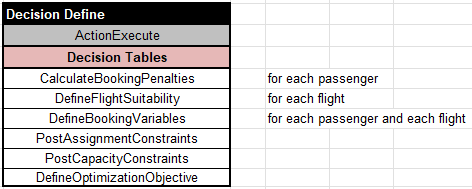
The decision tables below show the implementations of these sub-decisions.
- Calculate Booking Penalties for each passenger:
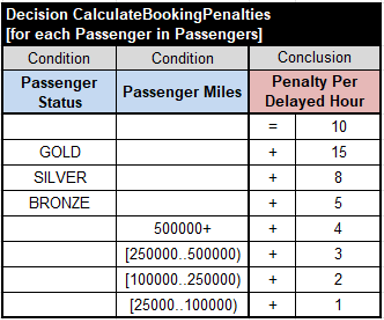
2. Define Flight Suitability for each flight:
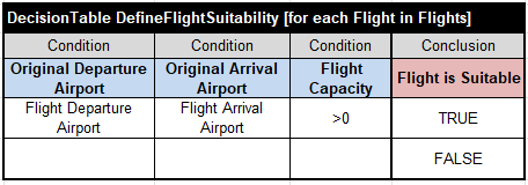
3. Define Booking Variables. This decision for each passenger executes 3 sub-decisions for every suitable flight:
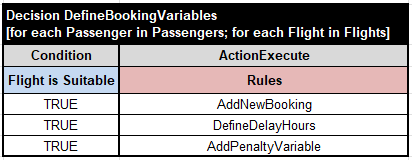
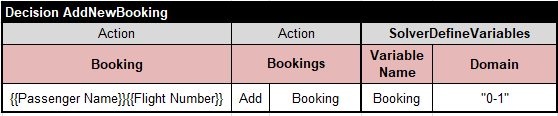
3.1. Define Solver’s Variables. This decision assigns a unique name to the current Booking (using a combination of Passenger Name and Flight Number), adds this Booking to the array “Bookings”, and then adds a new constrained variable for this Booking:
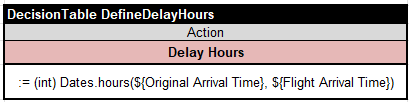
3.2. Define Booking Delay Hours for the current Booking as the difference between Flight Arrival Time and Original Arrival Time:
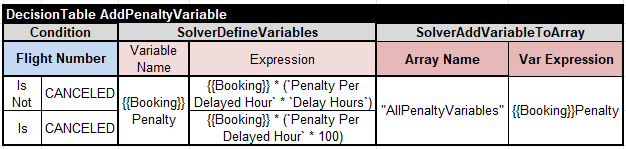
3.3. Add Penalty Variable for the current Booking in accordance with these definitions:

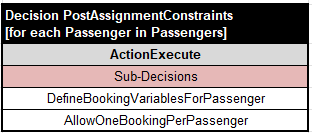
4. Posting Assignment Constraints to state: “Each passenger can be assigned to one and only one flight”:
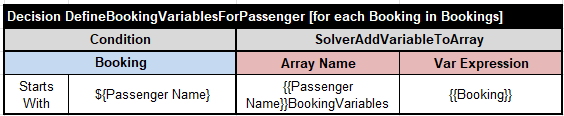
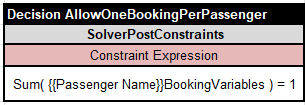
5. Posting Capacity Constraints to state: “For each flight, the number of booked passengers should not exceed the flight capacity”:
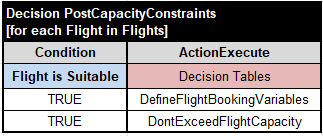
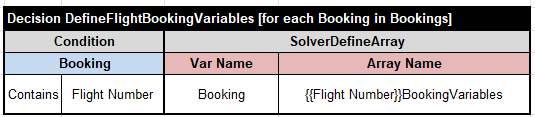
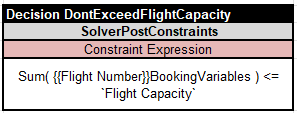
6. Defining Optimization Objective:
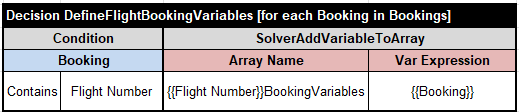
Note that some of the above decision tables effectively use combinations of regular columns of type “Condition” and Rule Solver’s columns of type “SolverDefineVariables”.
This completes the Problem Definition.
PROBLEM RESOLUTION
Here is the sub-decision “Solve”:
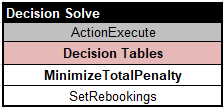
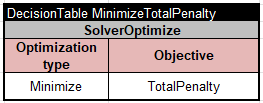
The decision Minimize Total Penalty relies on the predefined column “SolverOptimize” that will minimize the Total Penalty:
After the optimal solution is found, we will use the following table to add assigned Bookings to the output array “Rebookings” and print them out:
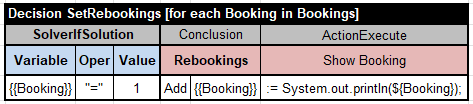
This table uses the predefined column “SolverIfSolution” to select only those bookings that were assigned the value “1” and ignore those with the value “0”.
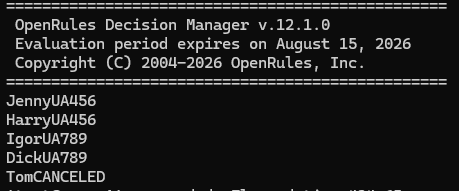
And finally, here are the produced results:
The automatically generated Decision Diagram is shown below:
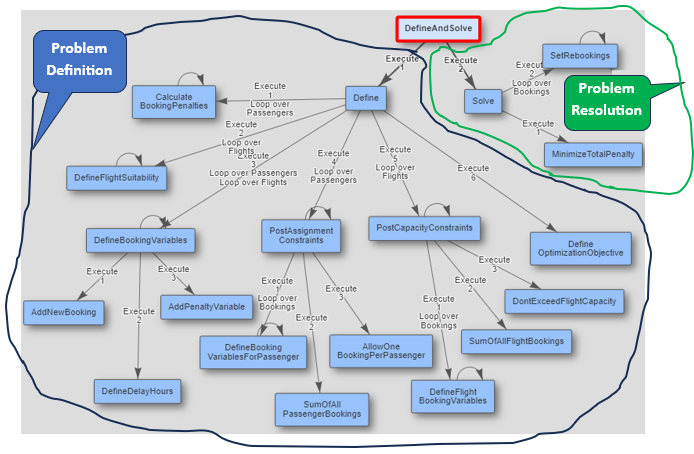
Thus, the problem definition is the major part of our decision model, while the problem resolution is really small and relies on predefined search strategies.
THE END